An e-Commerce Project Sample
Team5.com
Table of Content:
1 – Business Description
2 – Introduction
3 – System Requirements
4 – Use Cases Diagram
5 – Brief Description of Actors
5.1 – Customer
5.2 – Company Staff
5.3 – Shipping System
5.4 – Billing System
6 - Brief Description of Use Cases
6.1 – Use Case "Place Order"
6.2 – Use Case "Search Product"
6.3 – Use Case "Perform Checkout"
6.4 – Use Case "Validate Credit Card"
6.5 – Use Case "Maintain Order Information"
6.6 – Use Case "Maintain Customer
Information"
6.7 – Use Case "Maintain Product
Information"
6.8 – Use Case "Maintain Auxiliary Tables
Information"
7 – Event Fluxes for the Use Cases
7.1 – Event Flux for Use Case "Place
Order"
7.2 – Event Flux for Use Case "Search
Product"
7.3 – Event Flux for Use Case "Perform
Checkout"
7.4 – Event Flux for Use Case "Validate Credit
Card"
7.5 – Event Flux for Use Case "Maintain Order
Information"
7.6 – Event Flux for Use Case "Maintain Customer
Information"
7.7 – Event Flux for Use Case "Maintain Product
Information"
8 – Project Plan
1 – Business Description
About Us
Team5 is a world leader in dealing rare coins. We have a global market with over fifty years of service. Seeking to expand our business further, we are currently establishing an Internet presence, Team5.com.
Since 1949, our business begins as a grassroots effort based in the U.S. when a small group of collectors began trading coins through the mail. Since then we have grown into a Fortune500 company representing rare currency from every nation.
We have managed to keep our business costs down by distributing catalogs of our products and selling through mail order only. Striving to cut down cost further, we are currently constructing our ecommerce website. Team5.com will be a site allowing our customers to buy our coins online.
2 – Introduction
The main objective of this material is to provide the analysis and the design model for the implementation process of the eCommerce system of Team5.com.
The system will be developed under object-oriented techniques such as UML – Unified Modeling Language, and USDP – Unified Software Development Process.
The development team sincerely appreciates your comments, corrections, and suggestions for improving this document. Please address all correspondence to the following e-mail addresses:
[email protected]
[email protected]
[email protected]
[email protected]
[email protected]
3 – System Requirements
The goal of this project is to design and implement a system to Team5.com control its eCommerce web site to sell products via the Internet. The system needs to provide the following services:
3.1 – Administration Component:
- Allow Team5.com to manipulate (add, edit, delete) products;
- Allow Team5.com to manipulate (add, edit, delete) information of auxiliary tables necessary to the system, such as shipping method table;
- Allow TEAM5 to list and keep track of all orders.
3.2 – Application Component
- Provide the customers with a set of help pages (or FAQ) and instructions for support throughout their navigation in the TEAM5.com site;
- Provide the customer with an information page about the TEAM5 company and its activities;
- Allow customer to login and logout from the site
- Allow customers to search for all products;
- Allow customers to search for a specific product according to different search criteria
- Allow customers to browse through the products.
- Display detailed information of products;
- Allow customers to select products and place then into their shopping cart;
- Accept customer’s orders for products;
- List the customer and the products in the order;
- Store information about all customers that have placed orders;
- Allow customers to view a list of all orders they placed;
- Allow customers to view details of specific orders they placed;
- Allow customers to add or delete products of an order that was not shipped yet;
- Allow customers to modify the quantity of selected products of unshipped orders;
- Allow customers to create, update and edit their accounts;
- Allow customers to store preferences in their account;
- Allow customers to provide a list of shipping addresses;
- Allow customer to check out products through a regular or fast-path track;
- Allow customer to view the content of his/her cart;
- Allow customer to view a particular order status;
- Allow customer to choose from a list of shipping methods;
- Provide the user with a confirmation page when the transaction is completed;
- Allow customer to cancel an order that hasn’t been shipped yet;
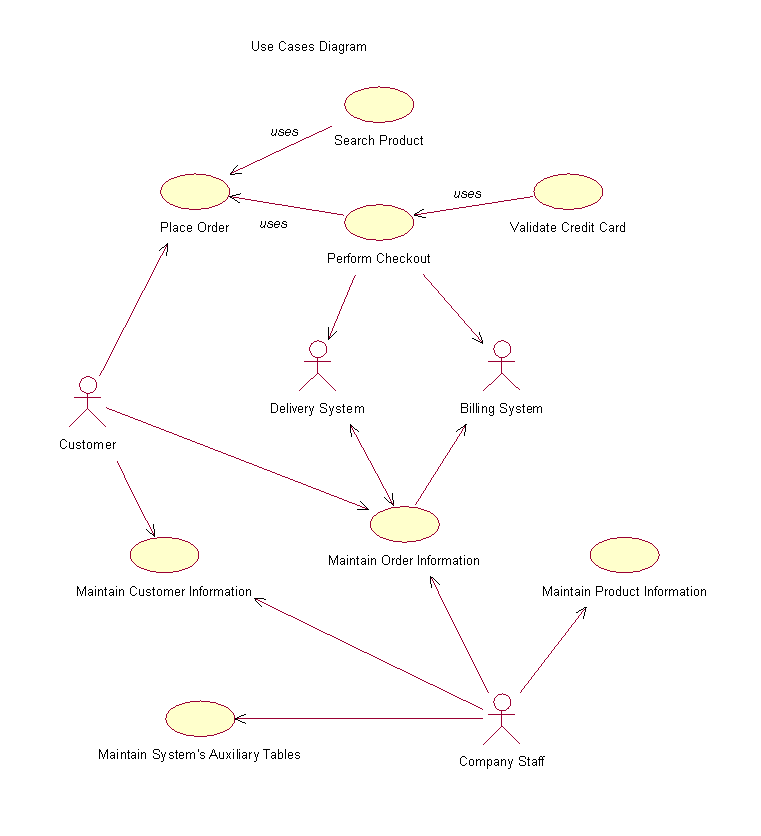
4 – Use Cases Diagram
5 – Brief Description of Actors
5.1 – Customer
A Customer represents a person who is responsible for buying products from Team5.com. This person may be an individual (i.e., not affiliated with a company) or someone within a business organization. The Customer is able to perform all the tasks related to the purchase process via web, as well as consult and modify his personal information and his orders information.
5.2 – Company Staff
A Company Staff represents any authorized employee from Team5.com that is responsible for providing basic information, such as product information, shipping information, type of payment information, and others, in order to the system operate well. Although it’s not his major activity and responsibility, the Company Staff is also responsible for responding to customer queries about the status of an order, for updating customers and orders information when necessary. This is usually required when a new customer is not familiar with the system and calls a staff from Team5.com for help over the phone.
5.3 – Shipping System
The Shipping System represents an integrated system that is responsible for checking if an order is complete, generating the shipping orders, delivering the order, and updating the e-commerce system with the appropriate shipping date of the order.
5.4 – Billing System
The Billing System represents an integrated system that is responsible for generating and sending payment invoice to customers and control their payment as well.
6 – Brief Description of Use Cases
6.1 – Use Case "Place Order"
The Customer starts this use case. It allows the Customer to select products, place them into his shopping cart (same as order), and purchase them.
6.2 – Use Case "Search Product"
The Customer starts this use case. It allows the Customer to search for products, and view detailed information about them.
6.3 – Use Case "Perform Checkout"
The Customer starts this use case. It allows the Customer to perform checkout by login in to be validated by the system, as a registered customer, informing type of payment, credit card information, preferred shipment, address for shipment and confirm the transaction.
6.4 – Use Case "Validate Credit Card"
This use case is started by the use case "Place Order". It allows the system to check if the credit card number informed by the customer is valid and with enough credit for the current purchase.
6.5 – Use Case "Maintain Order Information"
This use case is started by the Customer or by the Company Staff. It allows the Customer or the Company Staff to modify, remove, consult, print and revise information of an order placed by the Customer previously.
6.6 – Use Case "Maintain Customer Information"
This use case is started by the Customer or by the Company Staff. It allows the Customer or the Company Staff to create, modify, remove, consult, print and revise customer’s account information.
6.7 – Use Case "Maintain Product Information"
This use case is started by the Company Staff. It allows the Company Staff to create, modify, remove, consult, print and revise product’s information.
6.8 – Use Case "Maintain Auxiliary Tables Information"
This use case is started by the Company Staff. It allows the Company Staff to create, modify, remove, consult, print and revise information of auxiliary tables that are necessary for the system to operate well. These tables store information such as type of shipping information, and type of payment information.
7 – Description of Use Cases Event Fluxes
7.1) Event Flux for Use Case "Place Order"
Pre Condition: Be a registered Customer and have credit to purchase products.
- Main Flux:
This use case starts when the Customer connects to the website of Team5.com, search for products and place them into his or her shopping cart, which is the same as an order. Every time that a new product is added to the order, the system assumes automatically that only one unit of that product is being purchased. The system presents to the Customer a page showing the content of the order until that moment, showing that the current product that was added was included in the order, and that the quantity for it is one. In this page the Customer is allowed to change the quantities of the products being purchased. Next time that a new product is added to the order, the system repeats these steps, but showing the updated quantities that were provided by the customer.
The page that displays the content of the order also presents the following activities:
|
|
|
|
If the selected activity is:
- Check Out(A-1): execute sub-flux "Perform Check Out"
- Submit Changes(A-2): execute sub-flux "Update Quantities"
- Remove(A-3): execute sub-flux "Remove a specific product"
- Remove All(A-4): execute sub-flux "Remove all products"
The Customer is allowed to cancel this use case at any time of the event flux. In case this happens no operation is processed with the Order and the use case restarts.
- Alternative Fluxes:
(A-1) – "Perform Check Out"
Start use case "Perform checkout".
(A-2) – "Update Quantities"
The system should update the order with the quantities that were provided by the Customer and display again the page showing the content of the order.
(A-3) – "Remove a specific product"
The system should remove from the order the product selected to be removed by the Customer and display again the page showing the content of the order.
(A-4) – "Remove all products"
The system should remove all products from the order and display again the page showing the content of the order to the Customer. In this case there should be a message informing that the order is empty.
7.2) Event Flux for Use Case "Search Product"
Pre Condition: None.
- Main Flux:
This use case starts when the Customer connects to the website of Team5.com, and selects the option to search for product. The system presents to the Customer an interface where he or she can inform the criteria of the search, and the following activities available:
|
|
If the selected activity is:
- Submit(A-1): execute sub-flux "Submit Search"
- Reset(A-2): execute sub-flux "Reset Fields"
The Customer is allowed to cancel this use case at any time of the event flux. In case this happens, no search is performed and the use case restarts.
- Alternative Fluxes:
(A-1) – "Submit Search"
If the customer did not provide any criteria to refine the search, the system will retrieve and display a list with all the products in the inventory. If the Customer provided some criteria to refine the search, the system will search the inventory and display a list with only the products that attended those criteria. Both lists display the products as links.
At this moment, if the Customer clicks in a link, the system will present a page with detailed information of that specific product that was chosen by the Customer. This page with detailed information of a specific product must display to the Customer the following options:
- Perform another search; this link would redirect the system to the page that allows the Customer to inform the criteria for a search on products.
- Add this product to the cart; this link would redirect the system to the page that shows the content of the order until the moment.
(A-2) – "Reset Fields"
The system cleans all the fields of the page that searches for product and waits for the Customer’s action.
7.3 – Event Flux for Use Case "Perform Checkout"
Pre Condition: Be a registered Customer, be logged into the system and have credit to purchase products.
- Main Flux:
This use case starts when the Customer selects the option to perform checkout. The system will present a sequence of interfaces to the customer to provide necessary information for the checkout process and finally the confirmation of the transaction.
If the Customer is not logged into the system, the system requires the Customer to login by displaying a page where he or she can inform the username and the password. This page also provides an option to the Customer select in case he or she does not have an account yet. In this case, if the Customer does not have an account yet, the system redirect the process to the use case "Maintain Customer Information", to allow the Customer to create an account and then proceeds with the check out process.
After the Customer logs in, the system presents a page where the Customer can select the type of payment. If the Customer chooses credit card, the system requires a credit card number to be informed and start the use case "Validate Credit Card".
The next page allows the customer to select which address the system will use in order to deliver the purchased products.
Finally the system shows a page displaying all the information of the current order and requests the Customer to confirm the transaction by clicking in the option "Place your Order".
If the Customer confirms the transaction, the system displays a page to thank the Customer for purchasing with Team5.com and also confirming that the order was placed successfully.
The Customer is allowed to cancel this use case at any time of the event flux. In case this happens no operation is processed with Order and the use case restarts.
7.4) Event Flux for Use Case "Validate Credit Card"
This use case is started by the use case "Perform Checkout". It allows the system to establish connection to a credit card service provider and obtain validation for the current purchase. This validation is based on the credit card information provided by the customer, and also based on the amount of money of the current purchase. No more details are necessary since the system uses an interface provided by the credit card service provider.
7.5) Event Flux for Use Case "Maintain Order Information"
Pre Condition: Be a registered Customer with placed orders, be a valid staff of the company with permission to maintain order information, and have the order status as "Not shipped". Orders that were shipped cannot be deleted or updated.
- Main Flux:
This use case starts when the Customer or the Company Staff selects in the site the option to maintain customer information (usually a link from Customer’s Account). The system will require them to login as the Customer and inform their password. The Company Staff in this moment must provide a system administrator password, which allows him or her to have access to the customer’s order information.
The system will display a page with links to all the orders placed by the Customer, and wait for some action. There will be two types of links in this page. Links that will allow them to view orders that were not shipped yet, if any, and links that will allow them to view old orders that were already shipped.
If they click in a link of an order that was already shipped, the system must display a page with all the information of that specific order, but with no option to allow them to update or delete the specific order. Once the order is shipped, the system displays its information just for revising. No deletion or modification can be done.
If they click in a link of an order that was not shipped yet, the system displays a page with all the information of that specific order, and links next to these informations that will allow modifications in the current order. The links for modifications are:
- "Click here to change the order"; this will redirect the system to the page that allows the Customer or the Company Staff to view the content of the order, modify quantities, remove one product.
- "Click here to edit payment information"; this will redirect the system to the page that collects payment information from the Customer.
- "Click here to change the shipping address"; this will redirect the system to the page that requires the Customer to select the shipping address.
The Customer and the Company Staff are allowed to cancel this use case at any time of the event flux. In case this happens no operation is processed with the Order and the use case restarts.
7.6) Event Flux for Use Case "Maintain Customer Information"
Pre Condition: Be a registered Customer with an account in the system, or be a valid staff of the company with permission to access and maintain customer information.
- Main Flux:
This use case starts in two major situations. The first situation is when the Customer informs to the system that he or she is a new user, and the system will be redirected to the page that allows the Customer to create an account (A–1). The second situation is when the Customer, already with an account, or the Company Staff selects in the site the option to maintain customer account. The system will require them to login as the Customer and inform their password. The Company Staff in this moment must provide a system administrator password, which allows him or her to have access to the customer account information.
In this second option, the system will display a page with links to all the activities that can be performed with Customer account, such as:
|
|
|
|
|
If the selected activity is:
- New Account(A-1): execute sub-flux "Create New Customer Account"
- Modify personal information(A-2): execute sub-flux "Modify Customer"
- Inform shipping preference(A-3): execute sub-flux "Inform shipping preference"
- Create Fast-Path checkout(A-4): execute sub-flux "Create Fast-Path checkout"
- View placed Orders(A-5): execute sub-flux "View Orders"
- Maintain list of Addresses(A-6): execute sub-flux "Maintain Addresses"
(A-1) – "Create New Customer Account"
The system displays a page with many fields in blank and waits for the Customer to inform the following information:
Name
Date of Birth
E-mail
Other fields (to be determined)
After informing all the fields, the Customer requests the system to save the information of the new account. The system checks if all the required information were entered (E-1), checks if the information are valid (E-2), generates an identification automatically, and saves the customer information for future use (E-3). The use case restarts.
(A-2) – "Modify Customer"
The system displays a page with customer information in the fields and wait for some action. The Customer or the Company staff should provide the new information to be updated and request the system to save the modifications. The system checks if all required fields were informed (E-1), checks if they are valid (E-2), and save the information for future use (E-3). The use case restarts.
(A-3) – "Informing Shipping Preference"
The system displays a page with different types of shipping preferences and wait for the Customer to select one. The Customer must select the desired type of shipping and submit his preference to the system. This is just to provide a fast way to complete the customer checkout processes. It does not mean that the customer cannot change the shipping preference of a specific order. The system saves the information for future use (E-3). The use case restarts.
(A-4) – "Create Fast-Path checkout"
The system displays a page that allows the Customer to provide credit card information for fast path checkout process. The Customer must fill the fields and submit the information to the system. The system checks if all required fields were informed (E-1), checks if they are valid (E-2), and save the information for future use (E-3). The use case restarts.
(A-5) – "View Orders"
Start use case "Maintain Orders".
(A-6) – "Maintain Addresses"
The system display a page with all the addresses provided by the Customer and the following options:
- Create a new address
- Modify an existing address
- Remove an address.
- Exception Flux:
(E-1) – Required field was not entered. The system displays a message saying that a required field of Customer was not informed and posts the cursor in the missing field. The Customer or the Company Staff enter the information or end the use case.
(E-2) – Invalid customer information. The system displays a message saying that a field of customer was not informed correctly and posts the cursor in the invalid field. The Customer or the Company Staff enters the information or ends the use case.
(E-3) – The system cannot save customer information. The system displays a message to the the reason why the information was not saved. The use case restarts.
7.7) Event Flux for Use Case "Maintain Product Information"
Pre Condition: Be a valid staff of the company with permission to maintain product information.
- Main Flux:
This use case starts when the Company Staff selects in the system the option to maintain product information. The system presents to the Company Staff the screen for product information maintenance, with a list of all existing products in the stock, all the other fields in blank, and the following activities available:
|
|
|
|
|
At this point the system must allow the Company Staff to retrieve information of an existing product by selecting one product from the list.
If the Company Staff selects one item from the list the system retrieves its information, places them in the appropriate fields and waits for the Company Staff to review, print, update or delete the specific item.
If the selected activity is:
- New(A-1): execute sub-flux "Create New Product"
- Save(A-2): execute sub-flux "Save Product"
- Delete(A-3): execute sub-flux "Delete Product"
- Close The Company Staff exits this use case.
- EndThe Company Staff exits the system.
The Company Staff is allowed to cancel this use case at any time of the event flux. In case this happens no operation is processed with Product data and the use case restarts.
- Alternative Fluxes:
(A-1) – "Create New Product"
The system cleans all the fields, except for the list containing all stock products, and waits for the Company Staff to inform the following fields:
Product Description
Price
Other fields (to be determined)
After informing all the fields, the Company Staff requests the system to save the information of the new product by selecting the option "Save". The system checks if all the required information were entered (E-1), checks if the information are valid (E-2), generates an identification automatically, and saves the product information for future use (E-3). The use case restarts.
(A-2) – "Save Product"
The system identifies if the product is new or an existing one being updated. If the product is new, the system understands that is supposed to add the new product into the product table, If the product already exists, the system understands that it is supposed to update the information of the existing product. Before adding or updating information the system checks if all required fields were informed (E-1), checks if they are valid (E-2), and save the information for future use (E-3). The use case restarts.
(A-3) – "Delete Product"
The system verifies that one existing product was selected and retrieved in the screen. Then the system asks the Company Staff to confirm the deletion. If the Company Staff confirms, the system removes logically the product from the product table. This product will not show up in future searches, but it will remain in the system to maintain the integrity of old orders that mentioned this product. After the deletion the system cleans all the fields and waits for the Company Staff to inform his next desired operation. If the Company Staff does not confirm the deletion of the product the deletion process is canceled and the use case restarts.
- Exception Flux:
(E-1) – Required field was not entered. The system displays a message to the Company Staff saying that a required field of product was not informed and posts the cursor in the missing field. The Company Staff enters the information or ends the use case.
(E-2) – Invalid product information. The system displays a message saying that a field of product was not informed correctly and posts the cursor in the invalid field. The Company Staff enters the information or ends the use case.
(E-3) – The system cannot save product information. The system displays a message to the Company Staff showing the reason why the information was not saved. The use case restarts.
8 – Project Plan
PHASE 1 – Requirements
WEEK 1,2
Define the scope and the requirements of the system.
PHASE 2 – Analysis
WEEK 2,3,4
Define Use Cases
Describe Use Cases
Define Test Cases
Identify Classes
PHASE 3 – Design
WEEK 3,4,5
CRC cards
Identify class responsibilities
Identify class attributes
Identify cooperative classes
Define Database Architecture
Define User Interface
Define Navigation
Design Test Cases
PHASE 4 – Implementation
WEEK 6,7,8,9,10,11,12
Admin Component
Product Maintenance Functionality
Customer Maintenance Page
Auxiliary Tables (shipment types, payment types, etc)
Application Component
Customer Maintenance (login and profile)
Order Maintenance (items in shopping cart)
Product Search
Payment Info (checkout)
PHASE 5 - Testing
WEEK 8,9,10,11,12,13,14
Unit Testing
Integration Testing
System Testing
Use Case Testing