For this tutorial you'll need PSP 7, 6 photos and some flower tubes.
1.�Open a new image : width: 400/height: 500/transparent.�
2.�Open a new layer ; name it 'Background'
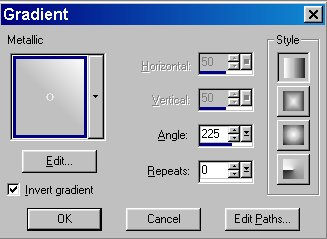
�Flood fill using the following settings :
3. Go to : Effects, Noise, Add : 10 %, Uniform.
���You've now got something similar to this (this is only a small part of the image) :

4.� Open a new layer ; name it 'Frame'.
�Using the 'Selection' tool, 'rectangle' shape, starting at 10,10 from the border, select a rectangle : width: 380 - height: 480.
�Go to 'Selections' and invert the selection. You've now got a 10 pixels wide border.
5.�Go to your colour palette and change the foreground to solid colour "#F15509". Flood fill the border with this colour.
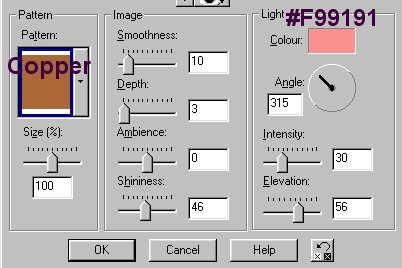
6.�Go to 'Effects', 'Texture Effects', 'Sculpture'.
Use the following settings :
�