

HMS is an integrated software for hotels. The functions of this system covers all the hotel operation functions and issues huge number of management reports that support the hotel managers in control and follow up.
HMS is modular software. It's components cover the operation and management needs of the hotel.
HMS is installed on one computer or on a network of unlimited number of computers. Workstation operating system is windows 98 or higher. Data Server could be Windows NT, 2000 or any network operating system.
HMS offers unlimited number of rooms and unlimited number of outlets.
HMS Features:
 Any relational Database Management System (RDBM) like Sql, MySql, Oracle, Access 2003 (The default) � etc.
Any Interface Language (English and Arabic interfaces are available)
Bills issued in two languages (English in Arabic interface (or vise versa) is available)
Web Enabled
Better Performance
More Functionality
Any relational Database Management System (RDBM) like Sql, MySql, Oracle, Access 2003 (The default) � etc.
Any Interface Language (English and Arabic interfaces are available)
Bills issued in two languages (English in Arabic interface (or vise versa) is available)
Web Enabled
Better Performance
More Functionality
| Applications Users System - V1.0.0 | |
| AUS | This is a common module for all integrated application systems like HMS, RCM, IPS, ... etc. The system adminstrator uses this application to define usres of the other modules and give them authorization for the modules functions. He also defines the basic data of the company like address, registration data, ... etc. |
| Download: Setup Help | |
| General Accounting System - V1.0.0 | |
| GAS | Define Account Types like client, vendor, cash, bank, ... etc. and account entities for each account type. Enters and updates account transactions for account entities. The entrprise operation systems post account transactions to designated acoounts. The system also defines credit cards and follow up checks and credit cards. |
| Download: Setup Help | |
| Items Catalog Management - V1.0.0 | |
| ICM | This module is used to define all items and products of the organization. It also defines the units and unit conversion table. The stock control system, Material Supply Management, and Order Processing Systems Like Hotel Outlets use the items defined in this module for their operation, i.e. The items definitions are common and standardized within the organization. The module maintains a standard descriptive code for items. It also include inquiries about detailed information about items like on order, on stock, balances, average price, lead time, ... etc. |
| Download: Setup Help | |
| Hotel Basic Data - V1.0.0 | |
| HBD | HBD defines the hotel to HMS system. It defines Meal prices, Taxes, Room Types, Rooms, Outlets, Outlet Items, Nationality table, and Maintenance Items. It also defines and maintains price offers to clients. |
| Download: Setup Help | |
| Hotel Front Office - V1.0.0 | |
HFO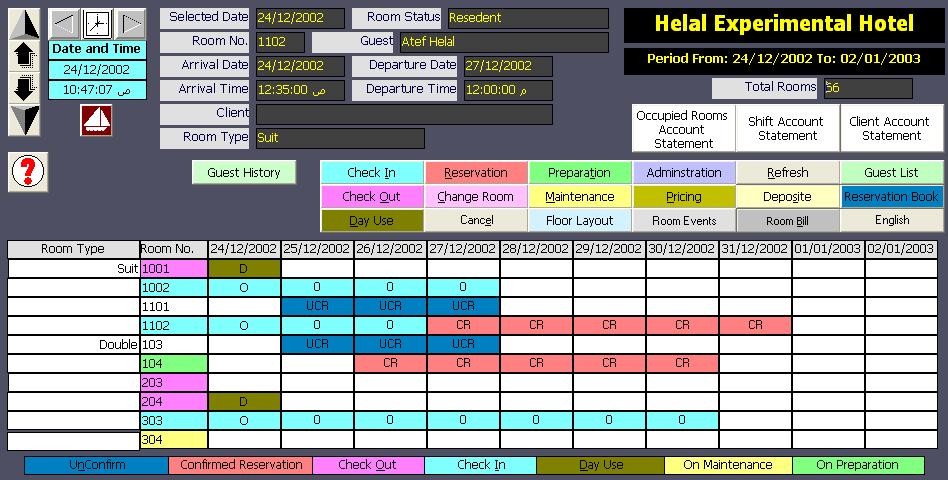
|
Through room-date layout interface which shows the status of hotel rooms for ten days, the users perform the front office functions like reservation, check in, check out, guest deposits, ... etc. Users select the start date of the room-date layout from a calendar or sequencially by the next or previous days functions or by typing the desired start date. Each status has a specific color and the details of room information is diplayed for the currently selected room on which the user performs the front office functions. The module includes a lot of inquiries and reports about front office operations like guest history, in-houst guest list, reservation list, room/guest/client account information, shift closing account statement, ... etc. |
| Download: Setup Help | |
| Hotel Outlets - V1.0.0 | |
HOT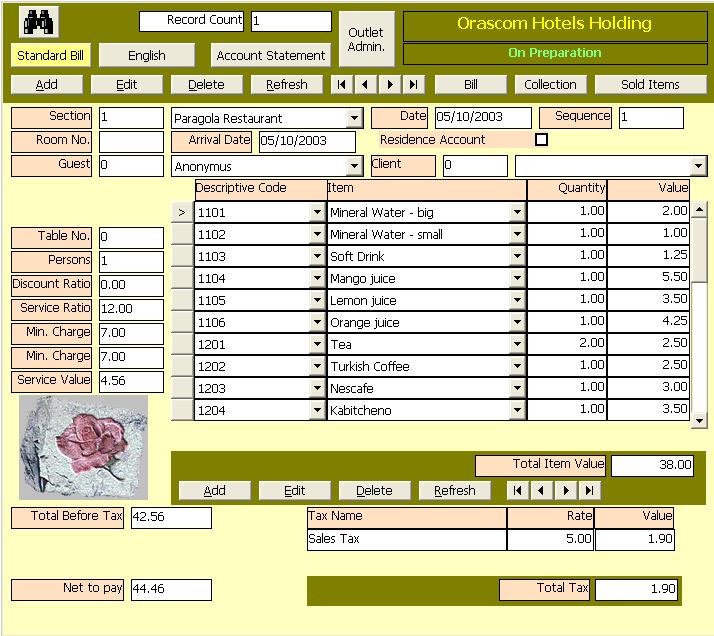
|
Outlets are services offered to hotel guests like restaurants, coffee shops, laundries, telephones. This module can be used for restaurants, coffe shops, and laundries independently from the hotel. The principal function of this module is order processing and bills issue. It prints a closing account statement and a sold items report. |
| Download: Setup Help | |
| Hotel Group Reservation - V1.0.0 | |
HGR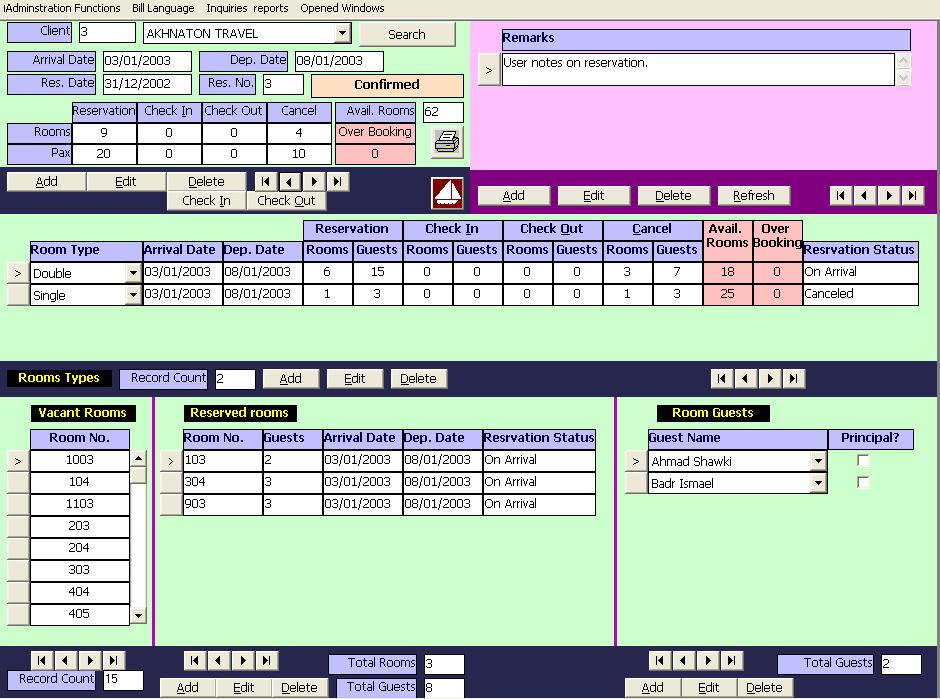
|
The reservation module has four levels of reservation. The highest level is for Clients (Agents or Tour Operators) to whom the guests belong. In the client level, users specify the client arrival and departure dates, number of rooms, and number of guests (pax). The system assigns reservation number and date that are used by all other levels of reservation. The second level is the level of room type. The users assign different room types along with arrival and departure dates, number of rooms, and number of guests (pax) for each room type. The system automatically assigns available rooms within the period specified for each type. The room reservation is the third level of reservation. The user may change the assigned rooms with the guide of a form displaying all the available rooms for the specified type for the specified period. The fourth level is the guest reservation. In this level, users assign guests to each reserved room. The first guest is considered the principal guest to whom the bill is issued. The users can change the principal guest if room has more than one guest.
After completing the reservation to the fourth level, the user can check in all guests defined when the status becomes �On Arrival�. The users also can check out all guests and rooms of status �On Departure�. On check out, the system prints a client bill along with a bill for each room. The system also prints a reservation list on request and sends email to client. |
| Download: Setup Help | |
| Hotel Room Service - V1.0.0 | |
HRS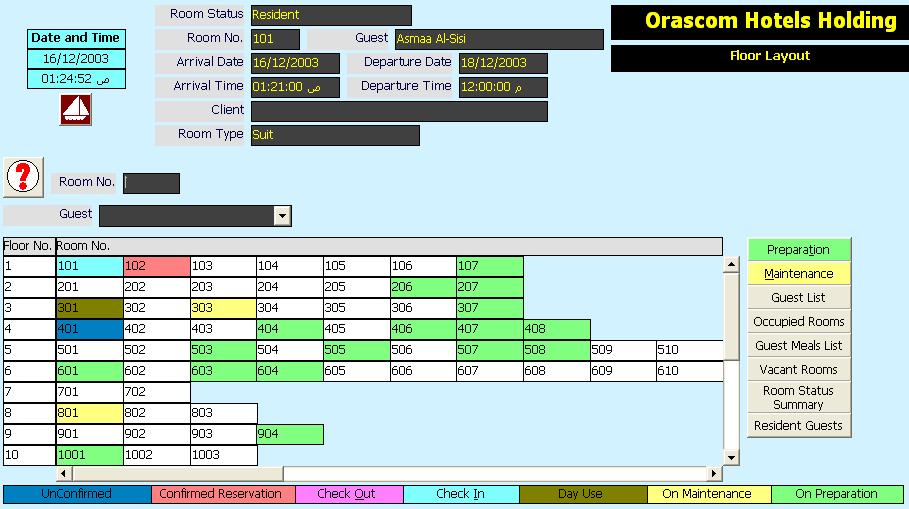
|
This module displays room layout by floors. The layout shows rooms status (Check In, Reserved (Confirmed and unconfirmed), Day Use, On Departure, On Prepartion, and On Maintenance. The status (On Prepartion) is assigned to rooms after check out and the module HRS clears this status after prepration of the room. The module also changes the status of the rooms to (On Maintenance) to prevent any operations on it untill the maintenace is complete. After maintenance completion the module records the maintenance items and their costs and clears the maintenance status. The module also isues a number of reports and inquiries like Guest list, Occupied rooms, Guest meals List, Vacant Rooms, Room Status Summary, and Resident Guests. The users of the module (HRS) can search by room number and/or Guest name. |
| Download: Setup Help | |
| Hotel Management Reporting - V1.0.0 | |
| HMR | This module issues four types of reports: Operational Reports, Financial Reports, Management Reports, and Adminstrative reports. Users of this module may have limited authorization to print some reports types. The operational reports Include: Room Reservation Report, Settlement Payment, Cash Receipt, Shift Account Statement, Client Account Statement, Room Bill, Guest List, Occupied Rooms, Guest Meals List, Vacant Rooms, Rooms Status Summary, Resident Guests, Detailed Rooms Status, Standard Outlet Bill, Mini Outlet Bill, Outlets Account Statement, Outlets Sold Items. Financial Reports include: Occupied Rooms Account Statement. Management Reports include: Room Occupancy Rate and Users Event Log. Adminstration Reports include: Define Reports Printers. |
| Download: Setup Help | |
| Material Supply Management - V1.0.0 | |
| HSM | The users of this module define Vendor Items and process purchase orders. The module posts the account transactions to Vendor accounts and store accounts on delivery phase of the supply process. |
| Download: Setup Help | |
| Stock Control System - V1.0.0 | |
| SCS | This module manipulates multi stores. It perofms stock count, adjustment, and items movement between stores and other entities like departements, clients, vendors. It posts the account transaction to the designated account. |
| Download: Setup Help | |
| Manpower System - V1.0.0 | |
| MPS | It is a human resources module. Under development. |
| Download: Setup Help | |
