
TUBEZ
Stars
Clouds
Christian
Symbols
Instructions on installing and deleting tubes (psp5):
To install new tubes:
If you downloaded tubes from the internet they probably came in a "zip" file and you will need a "zip" program to open it. You can get Winzip here. Open the zip file; double click on the image file. When the image is open in PaintShop, click on "File", go down to "Export"; go to "Picture Tube".
1) On "Cells across" fill in how many images there are in a row;
2) On "Cells down" fill in how many images there in a column;
3) This will be calculated by PaintShop Pro, it the number of total images in this particular tube.
4) Name the tube however you want.
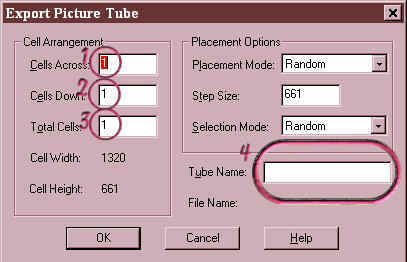
Everything between 3 and 4 I leave as it is.
Now when you use your picture tubes the new tube should be available.
Now if you have some tubes that you want to get rid of:
1) go to your Paintshop Pro file, then to "Tubes"
2) find the image file of the tube that you want to delete (We will get rid of "ACandy") right click and click on "Delete"
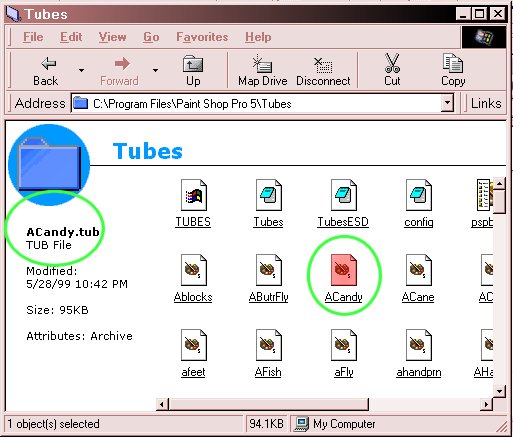
If you only do this part, Paintshop will still show the tube as an active one when you go into your tubes mode, but if you try to use it, you'll get this message:
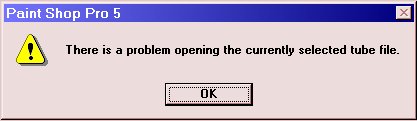
To get rid of it completely......
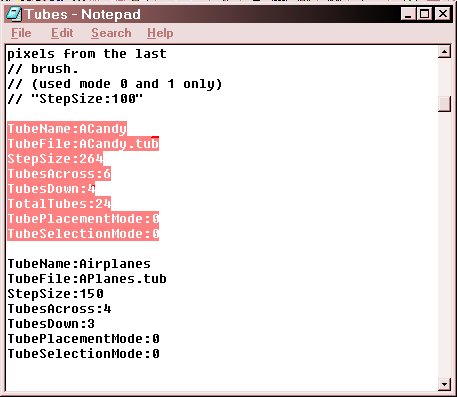
2) You are still in the "tubes" file; find a file called "Tubes" with a "ctl" ending. (This is a notebook/text file.)
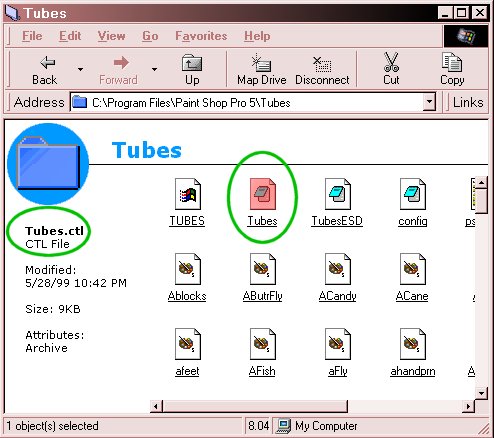
3) Open this file and go down to the listing until you find the information for "ACandy" and delete all the information relating to it.
| Home | Bio | Allen |
| Jesse | Kish | Backgrounds |
| Preset | Tutorials | Tubez |
| Fun Stuff | Girls Only | Pets |
| Texas Roadkill Award | Winners of Texas RoadKill Award | Webrings |
| Awards | Links (Tutorials, Freewarez, etc) |
