
Integrating Technology into the Technology Education Facility
The Future Scenario
We are all living and working in a society characterized by significant changes in the advancements in the accumulation and exchange of information and technology. To be able to succeed in this changing society, students must develop abilities in problem-solving, critical thinking, management of and use of resources, and the ability to acquire, evaluate and process information.
Visionaries see the walls of traditional schools to be figuratively broken down as we entered the 21st century. The structure of schools, the art of teaching, and the means by which students learn will dramatically change because of the abilities to access information from virtually any source.
The scenario of the future will include:
• Satellite Dishes (home & schools)
• Fiber Optic Cables (within our schools)
• Wireless Computer and Communications Connectivity
• Teleconferencing (digital computer video)
• Enhanced Electronic Security Systems
• Phone/Fax in Classrooms
• Desktop and Portable Computers on Every Teacher and Student’s Desk
• Elevated Teacher Comfort Levels with Utilization of Technology-Based Tools
• Internal and External E-Mail Resources (data, voice, and video)
• Demise of the Traditional Textbook
• Increased Distance Learning (satellite services, telecommunications, interactive television, etc.)
• Partnerships Between the Schools, Businesses, and Other Organizations
• Digital Information Resource Access in Every Classroom (CD-ROM, Internet, Teacher Web Pages, etc.)
• Flexible Schedules to Accommodate Project-Based Instructional Activities
• Technology-Curriculum Integration
• Remote Student Access to Technology Resources (Wired & Wireless)
• Non-Traditional Instructional Environments (eg., team teaching in large rooms, project orientation, problem-solving, information access online at all times)
It is our responsibility to evaluate the trends of society, technology, and education; and then to plan, determine, and implement initiatives which meet our immediate needs and serve as prerequisites for achieving long term goals. Teachers must enable all members of the community to utilize and integrate technology to effectively function in an ever-changing world.
Technology Education Laboratory and Classroom
Purpose and Goals
This classroom design features a variety of technologies, curriculum, instructional strategies, and hands-on problem-solving activities to better prepare students make career choices and adapt to their relationship with Technology. Technology Education also enables students to develop interpersonal skills through independent work and cooperative learning.
The curriculum is developed around an interdisciplinary approach by encompassing math, science, social studies, and language skills into our activities. Math and science skills are used to support design activities. Social studies topics focus on the use, historical development, and future trends of technology. Language skills center on the understanding and communication of concepts, ideas, and solutions in both verbal and written formats.
In this lab, students will be able to use many different computer-based technology modules, interactive simulations, peripherals, videos, software, hands-on activities, and prototyping materials encompassing the following areas of technology:
• Communications
• Manufacturing
• Transportation
• Power and Energy
• Construction
• Bio-Related & Biotechnology
Students are involved in and responsible for their own progress. Daily logs, written and oral presentations, reports and tests provide a comprehensive assessment of student’s work. Students will use wireless palm digital assistants for personal information filing and will eventually be able to interface whenever necessary from any location. Specifying certain modular manufacturers will provide the teacher with computer software that allows the teacher to perform record keeping, assessment, and scheduling.
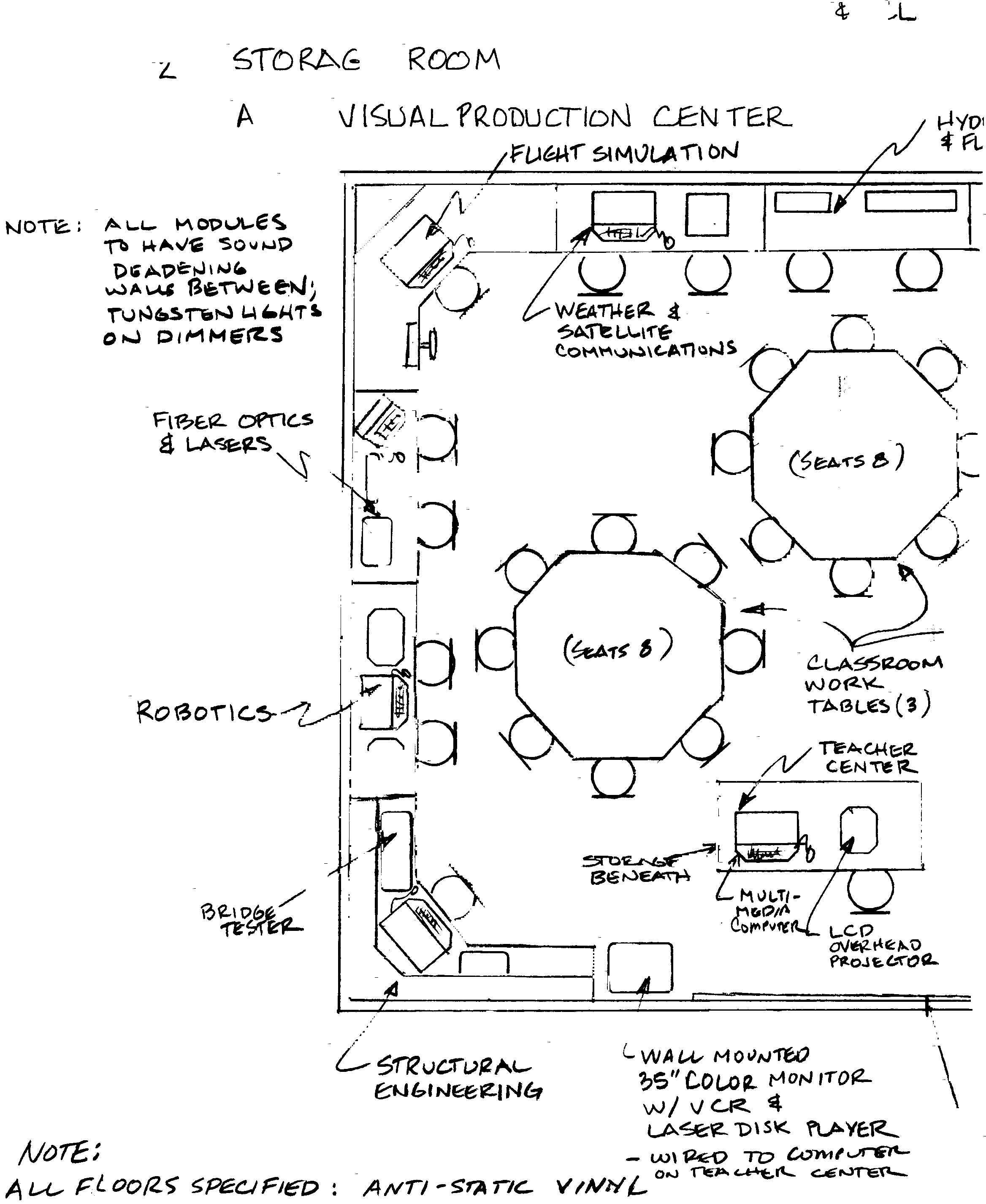
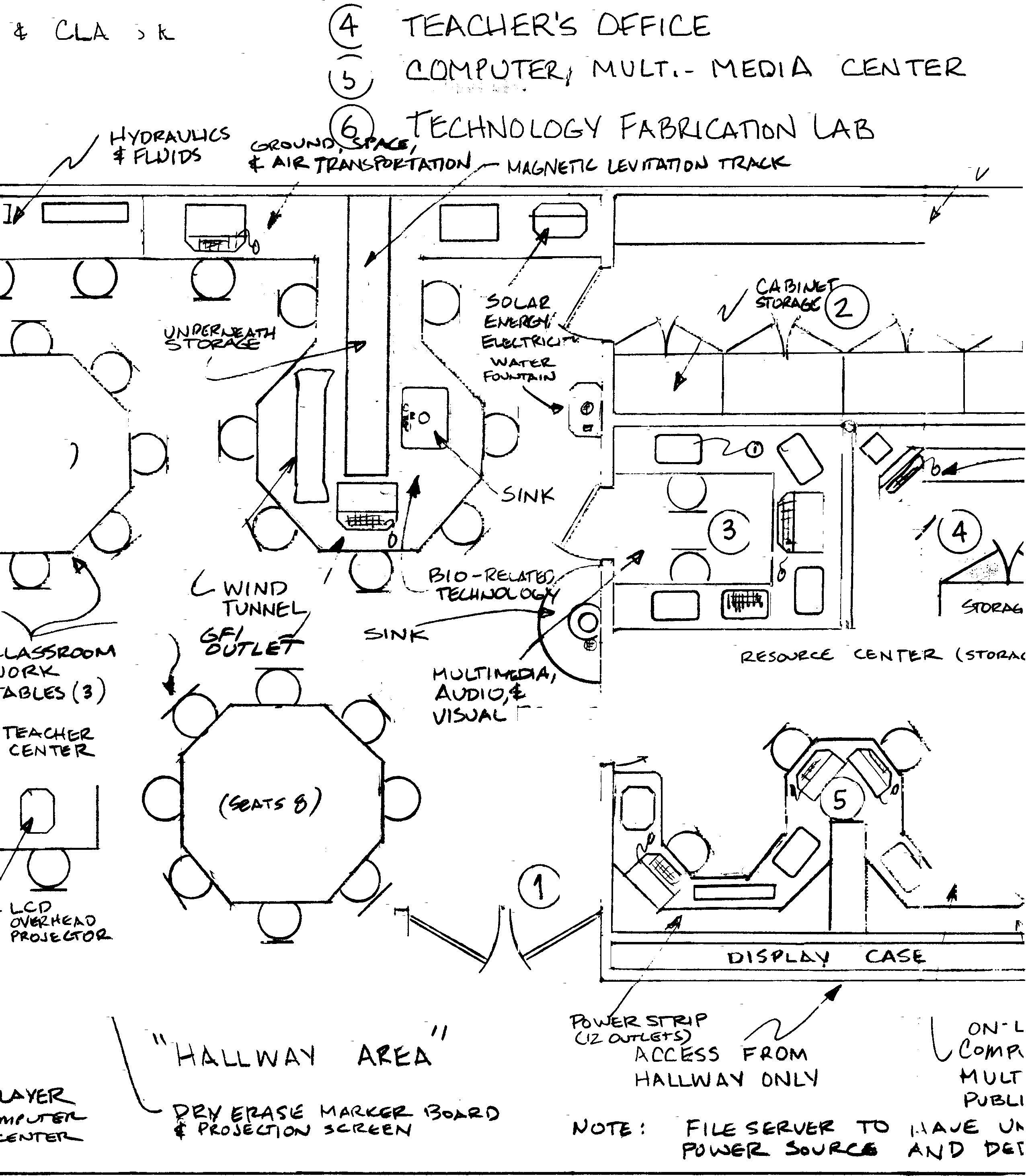
1. Modular Lab and Classroom Requirements
Note: IBM or Compatible Computers
should be Pentium based with Windows ,
128+mb RAM and a 10+ Gigabyte Hard drive including
a 17’’ Color Monitor, Keyboard, CD-ROM/DVD-R, Ethernet, and Mouse.
Flight Simulation Module
• IBM or Compatible Computer
• Virtual Pilot Yoke
• Joystick
• Thrustmaster Foot Pedals(2)
• Gamecard
• Simulation Software
• Curriculum Materials
Hydraulics & Fluids Module
• Hydraulic and Fluidic mechanisms
• Management system
• Individual Components
• Air Compressor
• Curriculum Materials
Fiber Optics & Laser Module
• Electronic Trainer Mechanism
• Helium Neon Laser
• Physical Optics
• Optoelectronics
• Curriculum Materials
Robotics & Control Technology Module
• Training Robots "CYEsr"(2)
• Lego Robolab Technology Kits
• IBM or Compatible Computer
• Programming Software
• Curriculum Materials
Structural Engineering Module
• IBM or Compatible Computer
• Activity Software
• Laser Printer
• Structure Testing Device
•Measuring Instruments
• Curriculum Materials
• Electronic Scales
Ground, Space, & Air Transportation Module
• IBM or Compatible Computer
• Activity Software
• Laser Printer
• Wind Tunnel
• Magnetic Levitation Track w/ Power Supply
• Curriculum Materials
Solar Energy & Electricity Module
• DC Electronic Components
• Solar Panels
• Soldering Gun
• Multi-meter
• Electronic Activity Kits
• Circuit Boards
• Power Supply
• Curriculum Materials
Bio-related Technology Module
• IBM or Compatible Computer
• Activity Software
• Blood Pressure Gauge
• Digital Thermometer
• Laboratory Materials and Supplies
• Curriculum Materials
• Stopwatch
• Sound Level Meter
• Physiology Charts
• Air & Water Pumps
• Hydroponic Components
• 20 gal Fish Tank
• Water Test Kit
• Ground Fault Interrupter Circuits(GFI’s)
Weather & Satellite Communications Module
• Satellite Dish and Support System
• Alignment Mechanism
• IBM or Compatible Computer
• Required Software
• Color Monitor
• Satellite Receiver
• Weather Station
• Cables and Connectors
• Image Capture Printer
• World Globe
• Weather Forecasting Software
• Curriculum Materials
Teacher Center
• IBM or Compatible Laptop Computer with Distance Learning Capability
• Video and Overhead Projector
• Laser Disk/DVD Player
• 36+’’ Color Monitor
• VCR
2. Storage Room
• Multiple Shelves
• Cabinets for Storage of Materials and Supplies
3. Audio-Visual Production Center
• Avid Digital Video Editing & F/X System
• IBM or Compatible with DVD-R, CD-RW, or Zip Drives
• Systems Software
• VHS-S Cameras (2) with Tripods
• Portable Lighting Kit
• CD Player
• Mixing Board
• Microphones and Stands
• Digital Video Camera
• Cassette Tape Player/Recorder
• VHS-S Editing Deck (2)
• Digital Media Editing Deck
• Curriculum Materials
• Instructional Guides and Videos
• Soundproofing on all Walls
• Additional Multi-media Software
4. Teachers Office
• IBM or Compatible Computer to be used for
classroom management
• Network Server and Uninterrupted Power Supply
• Laser Printer
• Networking Software
5. Computer/Multimedia Center
• IBM or Compatible Computer (2)
• Drives; Zip, CD-RW, DVD-R
• HP Flat Bed Scanner
• Digital Camera
• HP Plotter ( CAD application and color display )
• Laser Printer
• Curriculum Software (CAD, Desktop Publishing, & Multi-media)
6. Technology Fabrication Lab
• CNC Milling Machine
IBM or Compatible Computer
CAD/CAM Software
• CIM Manufacturing System
IBM or Compatible Computer
CIM Software
• Metal Lathe
• Sheet Metal Machines(3)
• Drill Press(2)
• Table Saw
• Surface Planer
• Jointer
• Scroll Saw(3)
•Band Saw
• Strip Sander
• Floor Sander
• Bench Grinder
• Milling Machine
• Various Hand Tools w/Storage
• Workbenches w/Vices
• 20’’ Color Monitor
• VCR
Teacher Center
• IBM or Compatible Computer
• Video, Tabletop Video Camera and Overhead Projector
All computers will be networked within the rooms; and will be networked through the schools main system for internet access. The quantity of communications cabling and interface ports will be significantly impacted by the number of computers in the room. As well, the electrical service will have to be greatly increased to handle the new power requirements. Surge protectors will protect all computer-based equipment.
Technology is a wonderful thing!
Hanby Middle School/Technology Education Lab Design Plans
 |
 |
 |
 |
Resources
Hearlihy and Company. (1994). Modular Technology Education Planning Guide. Hearlihy and Company.
McAlister, B. K. & Krueger, A. J. (2000). Technology Education Facility Planning. International Technology Education Association.
Modern School Supplies, Inc. (1995). Modern Technology Labs. Modern School Supplies, Inc.
Paxton/Patterson & Graves Humphries. (1992). Technology Education Handbook. Paxton/Patterson.
Pioneer New Media. (2001, February). Integrating Technology and Curriculum. The Journal. Pp. 60-63.
Synergistic Systems. (2000). Everywhere Success Everyday, Middle School Curriculum Guide. Pitsco.
Links
|
|
|