** HOME **
Utilize
Profile Setting
Just imagine that after
a long night of work and you want to stay in bed for a little bit later in the
morning, but someone called you early in the morning but finally it is a wrong
number call!!
What would you do? Turn
off the phone? What if your secretary in the office is calling you and try to
tell you that your BOSS is looking for you?
The function of Profile
You can find profile in
most of the Nokia and Ercisson mobile phones. The function of Profile is for
you to set a pre-defined condition for a select event. For example, you will
not accept any call at night but urgent call from your clients only!
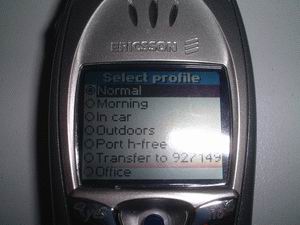
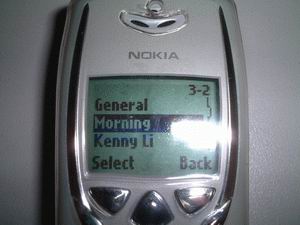
To setup/define your
profile :
Nokia : Menu -> Profiles
Ericsson : Setting -> Profile -> Edit Profile
The most useful function
in Profile is, you can select calls you like to accept. In
most Nokia and Ericsson, you will have an option to accept call from selected
calling group. "Accept Call" in Ericsson and "Incoming call alert"
in Nokia. Only people in these selected caller groups will ring your phone!
The rest of the caller not in these selected caller groups will have the following
treatment:
Nokia : The phone will not
cut the call but the phone will not ring! The call will keep on until timeout
or the caller cancel the call!
Ericsson : The phone will cut the call and the user will hear a busy tone!
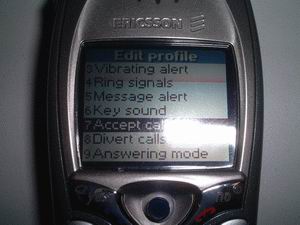
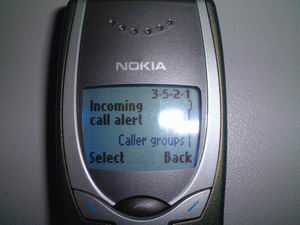
As long as I know, only
Nokia 8210 onward and Ericsson T39 onward will have the function like "Accept
call for select Caller Group" only. My Nokia 3310 does not have this function!
If you would like to creat
a "Morning Profile" like what I do, follow the steps below:
1) Nokia 8310/8250/8210
- Go to "Profile"
and select an unused profile
- Select "Personalise"
- Select "Ringing
tone", pick a tone with lower sound. "Bee" is my choice in
8310!
- Select "Ringtone
volume", pick a lower volume, Level 2 is enough for the morning!
- Turn off the "Vibrating
alert" because you don't need it!
- Turn off "Keypad
tones"!
- Turn off "Warning
tones"!
- Select "Alter for"
and pick the Caller Group you wolud like to receive their call early in the
morning. You must have assigned the Caller Group for the people you like to
receive their call!
- Rename this Profile as
"Night" or "Morning" or anything you like!
2) Nokia 3310
- 3310 does not have "Alter
for selected Caller Group" function like 8310 or 8250! So you have to
something more!
- In 3310, you can assign
Personal Ringtone for people in your Phonebook. Go to "Menu -> Phonebook
-> Assign tone"
- Assign a lovely ringtone,
for those important persons, like your girl friend, secretary, business partner,
clients and etc.
- Send a ringtone with
no sound (nothing) to your 3310 by using Logomanager or the like. You can
find a sample here. Download
No Sound Ringtone (right-click and select save as)
- Now, go to "Menu
-> Profiles" and pick a unused profile and select "Personalise".
- In "Ringing tone",
select the No Sound rigntone mentioned above.
- Select "Ringtone
volume", pick a lower volume, Level 1 is enough for the morning!
- Turn off the "Vibrating
alert" because you don't need it!
- Turn off "Keypad
tones"!
- Turn off "Warning
tones"!
- Rename this Profile as
"Night" or "Morning" or anything you like!
3) Ericsson T68i/T68/T39
- Ericsson T68i and T39
do have "Accept Calls" function in the profile setting! You can
select accept call from all, from list or from no one.
- Anyone NOT in the accept
list will hear a busy tone, because the phone will cut the line!
- It will not nice to cut
the line of the caller, even they are calling you not in a good time.
- Why not treat it like
what Nokia do, allow it to ring but you hear no sound?
- Keep "Accept calls
from all"
- Ggo to "Phone Book
-> Personal rings -> Add new?" and assign a lovely ringtone for
someone important.
- Send a ringtone with
no sound (nothing) to your T68i/T39 by using infra-red or cable! You can find
a sample here. Download
No Sound Ringtone for T68i (right-click and select save as) / Download
No Sound Ringtone for T39 (right-click and select save as).
- Now, go to "Settings
-> Profile" and pick a unused profile
- Go to "Settings
-> Profile -> Edit profile"
- Set "Ring volume"
to 2/6 is enough for the morning
- Set "Ring signals"
to No Sound ringtone mentioned above
- Turn off "message
alter" and "key sound"
Ok, before you go to bed,
select this "Night" profile! If you have 8310, you can also set the
Time for this profile too.
Good night :)
** HOME **