| SETUP |
| As of right now.. to record all of my songs I use a Pentium II 266 computer... (with MMX technology...woo! lol) a Yamaha Sound Card that came with it.. and a 99 cent Microphone from Wal Mart that fell into my pocket. Your equipment is the most important part of your recording experience.. and you really should'nt go cheap.. but for right now.. this is all we got to work with... the sound we produces is pretty good considering my computer was made about five thousand years ago. oh yeah.. running 9x tech too.. so laugh it up boyz. |
 |
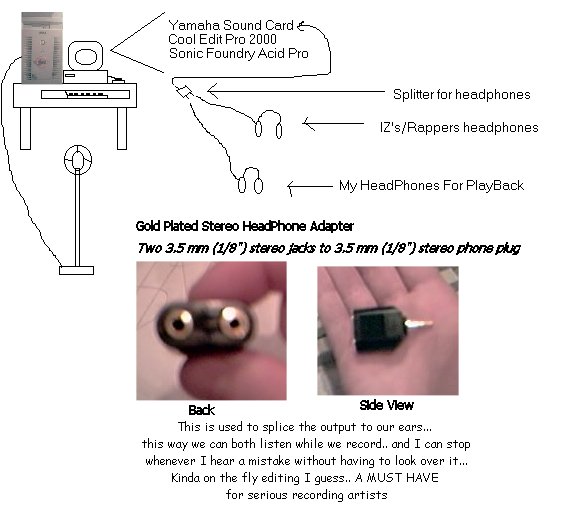 |
| Although my crappy drawing is'nt top o' the line it gives you a basic example of what you need to do... and I'm not getting paid for this.. so I was'nt goin to spend all fucking day on it. so here we go |
| 1.>> |
| << 2. |
| 3. >> |
| 4.>> |
| 5. >> |
| 5 blown up view>>> |
| 1. : Microphone (obviously) This is the most important part of the recording for obvious reasons.. this is where you don't wanna go cheap.. if you ever bought one serious piece of equipment.. splurge on the microphone it will pay itself off everytime you use it. |
| 2. : Computer Since my computer is shit.. you will need to get one a hundred times better so when you record some ish and its off the hook.. you can come back here and mock me or some shit.. whatever makes ya happy. but.. the faster the computer the less errors.. it's faster... the editing process can take up a hell of alot of time |
| 3. and 4. : HeadPhones For playback and recording we use headphones... this way we can reduce the background noise and not get feedback from the speakers.. to think, up until recently we were playing the music externally and laying the vocals...real ghetto style. to use the headphones.. we use a splitter (see diagram) this way when recording.. IZ can hear the music and his voice and I can get a good listen to it while its being recorded.. also that way I can get a perfect acapella that I can work with in our projects. this is how you get the professional sound in my opinion. the splitter simply hooks up into my yamaha sound card. |
| 5.: Gold Plated Stereo HeadPhone Adapter you can find one of these at any radio shack in the world. it's used to split one jack into two headphones.. make sure you choose the stereo adapter.. there is several out there... also make sure you choose the gold plated one.. these give you the best connection as gold insulates very well. anyways the guy there will tell you which one you need... tell him you need an adapter that lets you jack two headphones into one adapter..or something like that he will know.. make the universal two headphones jack hand signal or some shit... I don't know |
 |
|
 |
|
 |
| when your on the computer too long.. weird things start to happen |
| <<<< 6. |
| << 7. |
| 6.: Sonic Foundry Acid Pro 4.0 At first I thought this was the best program around.. I was basically using it to lay vocals over beats... I never knew that Cool Edit Could do Multitrack Editing.. if I did I would have been here alot sooner for you guys. but personally I think sonic foundry is the easiest graphical user interface ever. Basically drag and drop... paint and pencill load beat ..lay vocals boom.. definetly worth a peek if your into making music |
| 7.: Cool Edit Pro 2000 evvvverrryybody has used Cool Edit.. the police use it... dj's use it.. every emcee in the world has to have used cool edit b4... I love this program.. You can do basically anything you can think of.. the effects are amazing.. and you can load presets and effects into from just about any program out there. I would surely suggest locating this program, installing it.. and taking a good long look around.. experiment with different things .. find stuff that works with you.. that's really all I can suggest as of this moment.. |
| I wrote all that so you can get a grasp of whats goin on behind the microphone.. Maybe if you had some suggestions or maybe you wanted to submit your setup for this webpage leave me an email and I will get right back to you. |
 |

|
 |
| visitors so far.. |