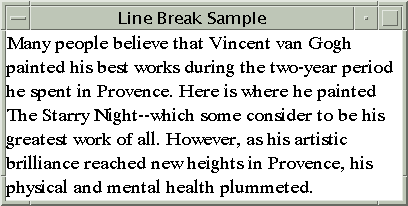
The complete code for this program is in LineBreakSample.java.
The following code creates an iterator with the string vanGogh. The start and end of the iterator is retrieved and a new LineBreakMeasurer is created from the iterator.
AttributedCharacterIterator paragraph = vanGogh.getIterator();
paragraphStart = paragraph.getBeginIndex();
paragraphEnd = paragraph.getEndIndex();

lineMeasurer = new LineBreakMeasurer(paragraph,
                            new FontRenderContext(null, false, false));

The size of the window is used to determine where the line should break and a
TextLayout object is created for each line in the paragraph.
Dimension size = getSize();
float formatWidth = (float) size.width;
float drawPosY = 0;
lineMeasurer.setPosition(paragraphStart);

while (lineMeasurer.getPosition() < paragraphEnd) {
   TextLayout layout = lineMeasurer.nextLayout(formatWidth);

   // Move y-coordinate by the ascent of the layout.
   drawPosY += layout.getAscent();

   /* Compute pen x position.  If the paragraph is
      right-to-left, we want to align the TextLayouts
      to the right edge of the panel.
    */
   float drawPosX;
   if (layout.isLeftToRight()) {
       drawPosX = 0;
   }
   else {
     drawPosX = formatWidth - layout.getAdvance();
   }

   // Draw the TextLayout at (drawPosX, drawPosY).
   layout.draw(graphics2D, drawPosX, drawPosY);

   // Move y-coordinate in preparation for next layout.
   drawPosY += layout.getDescent() + layout.getLeading();
}


