
Created: October 28th, Last Updated December 11th
--------------------------------------------------------------------------------------------
This tour is good whether you're using the Professional or Home versions of Windows, being that the only difference between the two is that the Pro version costs more, but the Home version is designed to allow little ads in the form of dialogue boxes to appear every few minutes.
First you'll notice a few icons on the Desktop, you can add icons that will open a program of your choosing. For some reason MS loves calling these "shortcuts" and makes a little arrow appear in the lower-left corner of the icon. I despise those arrows! Who cares whether the program actually on the desktop or not? It makes no difference! Cut out the bullshit shortcut arrows!

Let's see, what's next? Ok, you can run a computer with a clock speed of 345 Ghz and it's still going to run like it's about 2. Why? Because the new streamlined design makes sure 99% of your processing power goes toward making those purty-lookin' blue title bars. Oh yeah, and you'd better like the look of blue title bars, or metal, or puke green, because those are the only colours you can get if you want to use the new XP look. God forbid they build in a program that adjusts the hue so you can make the colour whatever you damn well want. And of course Windows spells it "color" because adding the 'u' requires you to install a 90GB program and a space-wasting "language bar" to convert it to Canadian English. (Why call it English anyway? I'm in Canada, not England!)
Since Windows is designed to mess up anything related to Word Perfect, why not try out Microsoft Word? MS has thought of an ingenious menu feature; if you haven't picked an item from a menu in the last 15 seconds, MS hides it for you! How convenienent! Because otherwise... the menu would be too long... or something. So thanks for saving me from that bullet. Of course, now I can't make a bullet because they're hidden from the menu, but maybe if I add a hyphen somewhere the program will automatically create a bulleted list without my consent. And the bullets will be the wrong size and mess up my font. ARRRGH!
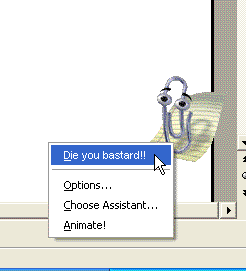
Oh sure, you can turn off these exciting new menu features, but why do I have to go through all that trouble when it's a stupid function that noone likes in the first place? It's like sticky keys. If you're playing a game and press shift a bunch of times, Windows comes in and ruins your game to offer you "sticky keys", which apparantly make things easier for the physically disabled. What the hell? If I wanted to turn on "sticky keys", I'd go into control panel and turn them on! Why would a handicapped person instictively press shift 5 times in one second to turn this function on? Now I have to go into control panel to turn off the function that brings up a dialogue box that offers this function! Sometimes I wish I could buy a Mac (or a Mac 10) and end this bullshit.
Maybe you should check your e-mail. If you happen to use Hotmail (which is "strongly reccomended" by Microsoft), you'll probably notice some advertising for Hotmail "Extra Storage". $30 American a year for 8 extra Megabytes of storage you say? Sounds like an enticing deal! For God's sake, Yahoo has only given me twice that for free so I can kill their broadband with horrendously made screenshots and meaningless articles! It gets better; the pay version of Hotmail won't delete your account if you haven't checked it in 3 months, which raises the question "Why would you spend $3 a month on an email service that you don't even use?"
