 |
|
| Newbie Guide! |
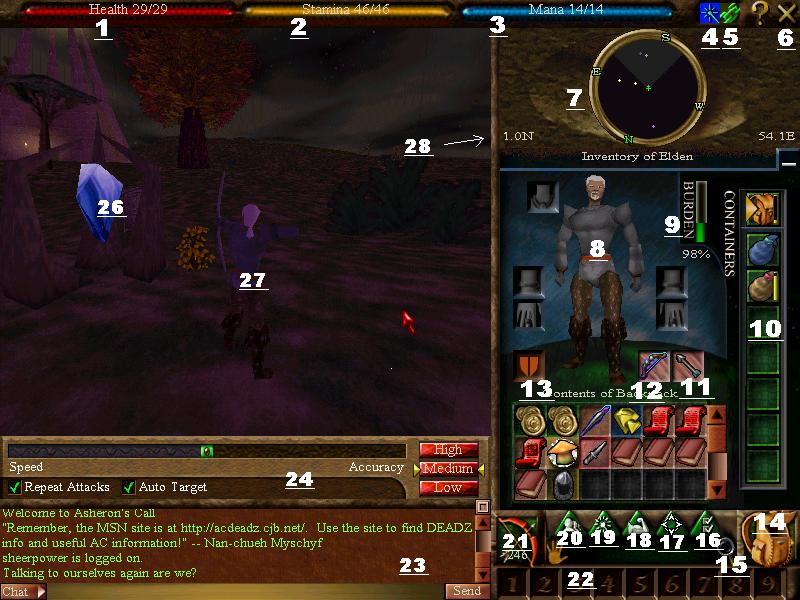
| The picture below has lots of numbers in it. Look at the numbers to see what they mean. Even if you know what they mean, check em anyway, I put losta tips and related stuff in there. enjoy! |
| 1. Health- this is pretty obvious. if it reaches 0, you go back to the lifestone you last tuned to. Try not to die, you lose alot of money and items that way, plus you get a vitae penalty every time you die, and it only goes away after you have gotten some more experience. Tip: When your life drops below 1/3, run. or if you're good enough, heal yourself when you reach 1/2. Also, when you die, if you are unsure where your corpse is, type /corpse and it will give you the location. tips of location finding later on. 2. Stamina- This is also obvious. as you jump or attack, it goes down. keep some food handy or some stamina potions if you have any, becuase when you reach 0 your attacks start to really get weak, and you cant run as fast. Tip: before jumping into battle with a group of enemies, make sure your stamina is full. Best way to regenerate stamina without potions or food is to go into peace mode and lie down (lie down= b, sit=g, kneel=h, stand=y) 3. Mana- when this runs out, you cant cast spells. Resting doesnt do much for quicker mana regrowth, there are potions and other ways to regenerate mana quickly, but for non-mage characters, time is the best way. 4. That blue wand thingy you see there is the magic window. click on that to see what spells are currently affecting you. There is an option in the character window (#16) that allows you to see a timer for how long the spells will last. (Not shown= when you die, a red box would appear next to where the blue one is. click on that to see how big your vitae(vitae= you get a bit weaker) penalty is, and how much experience it will take to get rid of it. Also, when you dieyou drop things from your inventory. Keep notice of what you lost before running back to get your body) 5. Connection Meter- click on this to see your connection. when your connection gets bad, this icon turns yellow and then flashes red if its really bad. Tip:A good hint at a bad connection is when you start running really slow and the messages you write do not come up in the chat window. try to steer clear of enemies when this happens 6. Big X- click here to exit. 7. This is your radar. Yellow dots are computer controlled, enemies and store owners. Red dots are player killers, but dont worry, they can only hurt other PK's not us normal guys. White dots are other human players, purple dots are portals. 8. Character- Lookin good ;) You can put armor and jewlry on by clicking and dragging the armor to the correct place (jewlry goes into the boxes on the sides) 9. Burden- do NOT let this go over 100. There is no difference under that, but once you reach a hundred, your stamina drops quickly and so does your speed. be very careful not to buy armor that is too heavy for you. Tip: archers, mages are weak physically, do not buy metal armor for them, stick to leather or grommie hide. Soldiers can go for the bigger stuff. 10. Conatiner Slot- After you amass a large amount of stuff, it sometimes helps to buy a container to help organize your possesions. For example, I always keep a blue container on me for spell components, and a red container for any extra armor/weapons that I pick up. That way i have no confusion of what is mine and what I want to sell. 11. Ammunition Slot- above this number you see the arrow there. If you use a weapon with ammo (bow, crossbow ect) drag the ammo there before you go hunting. that is where you take the ammo from, not from your pack. 12. Weapon slot- drag your weapon here. 13. Shield slot- drag your shield here 14. Pack Button- you can minimize the pack by clicking the blue line next to where it says "Inventory of (name)" to bring it back up and see what is in your pack, press this 15. Magnifying glass. Select and item, creature, or person. Then click this to evaluate it, him/her. 16. Character Options. Here you can change options around, video settings, preferences for gameplay ect. Realevant commands for newbies, click on the Character tab, select "show coordinates below radar." That will show you where you are at all times, and makes it easier to navigate if you are looking for a body or trying to find someone. 17. Map- shows you a map of Dereth (hehe but the maps on my site are better :p ) 18. Stats- See your stats and attributes. As you gain exp, you will notice that you also gain 'unassigned exp' at the bottom of this window. You should take time every now and then to raise a stat a level or two. Keep in mind, quickness affects your running and battle, strength and endurance affect your health, focus and self affect your mana. You can also raise your skill level, and make yourself more proficient in healing or your choice weapon. As you gain a character level, you will also get one skill point. After a few of these, you can learn a new skill, like maybe you want to learn a new skill? Well, be careful, as your level gets higher after level 10, you start to receive skill points less and less. Skills you should learn if you dont already have are, healing, arcane lore, item enchant, life magic. Thats just my opinion tho, dont let me limit your choices of what you want your character to do. :) 19. Magic- click here to learn spells/ allocate spells to a certain number. To learn a spell(must be a high level, sorry newbie), I recommend finding the program Decal online, and then finding the program Arcane knowledge. Install them in that order, and use them to help you learn spells, Otherwise, its alot harder, but its your call. Also keep in mind, if you want to cast spells, you have to have the components for them (those you can buy at archmage store anywhere). To see what you need, click on the spell and see what it lists. 20. Allegience Button- Allegiences are very helpful for all involved. You can swear yourself to someone, and they become your patron. Afterwards, they recieve some experience as you earn it, and in return they protect you and help you when they can. If you find a very good alliegance, they become your family, and it makes the game so much more awesome :) 21. War/Peace button- Click this or the "~" button to switch modes 22. shortcut keys. each numbered box is tied to a number on your keypad. If you click and drag an item into one of these boxes, just press that number and you will use/equip/unequip that item. It makes things quicker 23. Text box. Type here and press enter to send message. All the people on your radar will receive it. Type "/tell (persons name), (message)" to send a message to somone not on your radar. Type "/p (message)" to send something to your patron. Type "/f (message)" to send to someone in your fellowship. Fellowship is temporary allegence, makes fellows appear green on your radar. you can make one in the allegience button And finally, Type "/reply (message)" to reply to someone who sent a tell to you. 24. Battle bar- That sliding bar near the top on this small window is fairly self-explaintory. Adjust it if you want more speed or more accuracy/strength. 25. haha it looks like I forgot to put in a 25. oops 26. Life stone- double click on this OFTEN when traveling. you can die anytime, anywhere. best be near your body when you do. 27. yourself- the reson you see me at an angle is becuase I used "F2" to switch the camera view. dont play around with this in battle, you want to be able to see where your goin after all 28. Coordiantes- these are the coordinates, refer to #16 on how to get them up there. Whew, thats a mouthful and a half! That is why i made this page, you can always refer to it, cuz its not going anywhere. Safe journey! |
| Ok, for staters, look here, then continue down the page. 1. What is a Patron? -refer to number 20 below on the key 2. Why do I keep dying? -well, like most TOTAL newbies, you're prob running around with no armor. If thats not it, check the levels of the creatures you are fighting. They should not be too much higher than you 3. What is that red star that appears at the top right corner of the screen when die? -click on it and it will tell you. also refer to number 4 on the key 4. I cant get my body, I got killed in a rough area and I cant get back there. -type "/tell zanth, can you help me" and I'l help if i can. If not, ask somebody by your lifestone. people are very nice in Dereth, we're all on this Island together. |