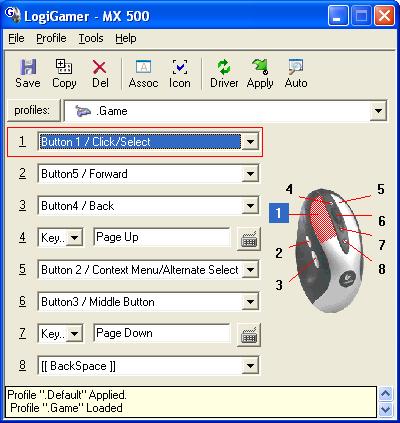
click here for JPEG version of screenshot
Having trouble using your new Logitech
mouse in games ?
click here for JPEG version of screenshot
LogiGamer is a utility that allows you to create different mouse button profiles for different applications, typically games, and then apply these mouse buttons settings for use with an application.(A profile is a collection of mouse button settings and other information specific to an application.)
LogiGamer also allows for the profile to be automatically applied when the associated application is launched, and for the default profile to be applied when the associated application exits.
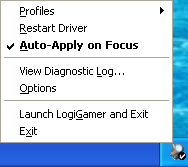
LogiGamer LITE, a companion utility to LogiGamer (much lower
memory usage), allows you to quickly apply and auto-apply profiles via a small
system tray icon.
The main difference is that LogiGamer LITE has a
new "Auto-Apply on Focus" function that allows you to set
LogiGamer LITE and forget it; profiles will be auto-applied depending on which
application has the focus(is active).
A profile will be
auto-applied for an associated application when that application receives the
system focus; i.e. when it is in the foreground, when it becomes the current
active window. If there is no associated profile the ".Default" profile is
applied.
LogiGamer LITE still needs LogiGamer for profile/associated app
management, sound options and new to LogiGamer "Exempt Application List"; exempt
apps will have NO profiles applied for them when they gain system focus
RECOMMENDED:See
LogiGamer LITE's ReadMe2.txt for general info, usage
&tips
NOTE:LogiGamer LITE is included in LogiGamer installation files
NOTE: LogiGamer requires the MS .NET Framework 1.1 and Logitech Mouseware , see included Readme & Help file for more info
Program Last
Updated: August 4th 2004: , Version 1.8.1
LogiGamerLITE August
4th 2004version1.3.8
Suggestions ?
Comments? Feedback?
E-mail
me (gpk) or post a message on LogiGamer Yahoo Groups
 also try my UT2004
Cache (download) Manager
also try my UT2004
Cache (download) Manager
 Download LogiGamer 1.8.1 + LogiGamer LITE 1.3.8
Help
support LogiGamer, Donate 5$ with PayPal (cannot accept Credit Cards,
yet) 
Updated August 4th 2004
LogiGamer LITE 1.3.8
To view the diagnostic messages you need to
enable logging in LogiGamer LITE (in Options)
AND you need
to download a utility to view the messages , I suggest DebugView (click here to get it)
Thanks to all for feedback, suggestions and bug reports!
It's very much appreciated!
P.S. Thank you all for your
emails. If you have asked a question I haven't answered please feel free to
email me again.
* See list of changes for versions below for more info.
*Replace the files in your Logigamer folder
UPDATED July 29th 2004
UPDATED July 26th 2004
LogiGamer LITE 1.3.6
 Default icon when auto-apply is off
 Black Circle w/
Checkmark indicates the .Default profile is auto-applied (when auto-apply is
On)
Black Circle w/
Checkmark indicates the .Default profile is auto-applied (when auto-apply is
On) Green Circle w/ Checkmark indicates that a profile is auto-applied
for an associated application (when auto-apply is On)
Green Circle w/ Checkmark indicates that a profile is auto-applied
for an associated application (when auto-apply is On)To view the diagnostic messages you need to
enable logging in LogiGamer LITE (in Options)
AND you need
to download a utility to view the messages , I suggest DebugView (click here to get it)
Thanks to all for feedback, suggestions and bug reports!
It's very much appreciated!
P.S. Thank you all for your
emails. If you have asked a question I haven't answered please feel free to
email me again.
* See list of changes for versions below for more info.
*Replace the files in your Logigamer folder
UPDATED July 22nd 2004
UPDATED July 21st 2004
UPDATED July 20th 2004
LogiGamer LITE, a companion utility to LogiGamer (much lower
memory usage), allows you to quickly apply and auto-apply profiles via a small
system tray icon.
The main difference is that
LogiGamer LITE has a new "Auto-Apply on Focus" function that
allows you to set LogiGamer LITE and forget it; profiles will
be auto-applied depending on which application has the focus(is
active).
A profile will be auto-applied for an associated
application when that application receives the system focus; i.e. when it is in
the foreground, when it becomes the current active window. If there is no
associated profile the ".Default" profile is applied.
LogiGamer LITE still
needs LogiGamer for profile/associated app management, sound options and new to
LogiGamer "Exempt Application List"; exempt apps will have NO profiles applied
for them when they gain system focus
RECOMMENDED:See LogiGamer LITE's ReadMe2.txt for general info, usage &tips
NOTE:LogiGamer LITE is included in LogiGamer installation files
* See list of changes for version 1.7.4 below for more info.