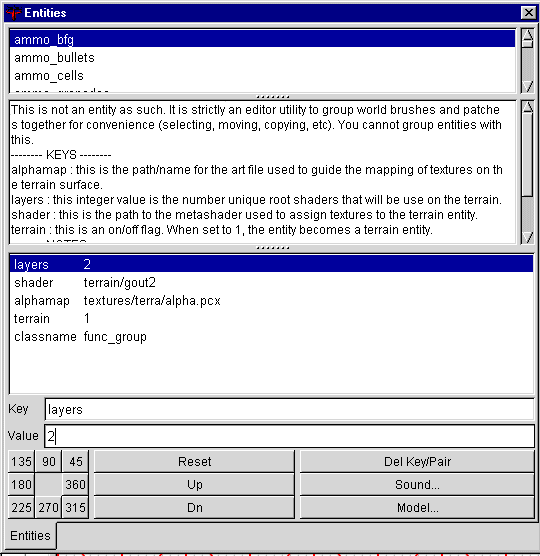
Now we will set up our terrain func group that was created with the gensurf plugin. First you should make it detail with ctrl-m, and it should turn blue, I think its already created as detail but the manual says to make it as detail so I do it again anyways. This window contains all the keys for our terrain func_group. Select our terrain func_grou by shift clicking on it, then hit the N key. This should bring up the entity window. You need to enter keys and values here for the entity, func_group should already be there.
Layers is linked to how many textures you are going to use in your metashader, which also limits how many colors you will use in the alphamap, its safe to start with 5 as unused colors are ok. I used a key of 2 as I knew how many I was going to use.
Shader is the shader you will use. I normally make the shader name the name of my map, so when I make my q3r_winter map, the key value was terrain/q3r_winter2. You should always put a 2 after the name as there are 3 sections in the meta shader. q3r_winter1 would be used in team arena for the cloud shadows being drawn on the ground, q3r_winter2 is for normal terrain, and I am not sure what the 3rd part is for. All will really need is the 2nd part so just make the shader name and add a 2 to it. A lot of that may not have made sense, and I don't know if its nessicaary, but I liked to follow the Manuals example.
Alphamap points to the location of your alphamap file. I placed mine in baseq3/textuers/terra/, but for the key you don't need to include the baseq3 directory, it starts out there.
Terrain set this value to 1 to tell the compiler that this is a terrain entity..