Credit Lookup Plus
Home |
Read Me
What's This?
A front end for the
Invelos Credit Lookup Tool (CLT), which presents the CLT data in a more useful manner.
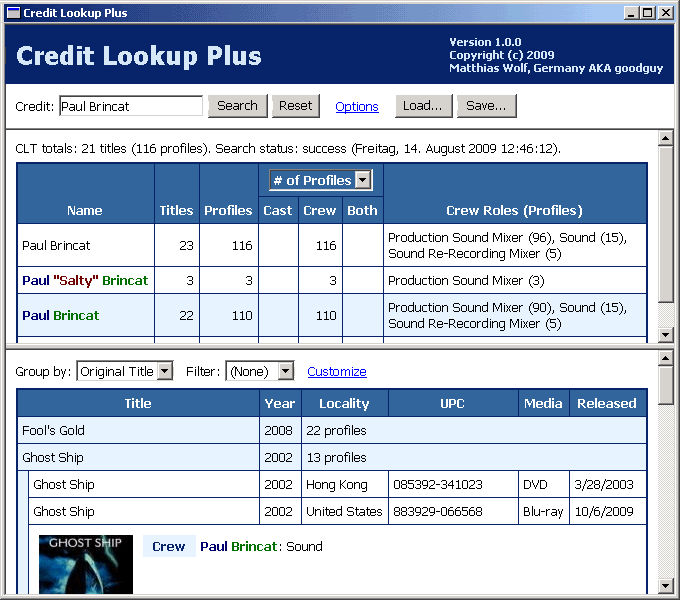
Credit Lookup Plus will download the data from the Invelos CLT and display them
grouped by common names and original titles.
Terms of Use
- This software is Copyright (c) 2009 Matthias Wolf, Germany AKA goodguy.
All rights reserved.
- Permission is hereby granted, free of charge, to use and redistribute this software
in unmodified form, for non-commercial purposes, and provided that any use or
redistribution retains or reproduces, in the documentation and/or other materials,
the copyright notice above, this permission and the following disclaimer.
- DISCLAIMER
This software is provided "as is", without warranty of any kind, express or
implied, including but not limited to the warranties of merchantability, fitness
for a particular purpose and noninfringement. In no event shall the author be
liable for any claim, damages or other liability, whether in an action of
contract, tort or otherwise, arising from, out of or in connection with the
software or the use or other dealings in the software.
Feedback
If you have questions, comments, or suggestions, you can send a PM to
goodguy on the Invelos forums. Alternatively, you can reply to this Invelos forum thread.
Make a Donation!
- Credit Lookup Plus may be used free of charge, but if you wish to express your
appreciation for the time and resources I have spent on developing this
software, you are welcome to make a donation using one of the following
PayPal links:
- Donate in Euros
- Donate in US Dollars
Install Steps
- Download CLTPlus.zip and unpack it into a dedicated folder.
- Create a shortcut to the unpacked CLTPlus.hta
on your Start Menu or on your desktop.
- On some systems, the file extension .hta (HTML Application)
might not be associated with the Microsoft program mshta.exe.
If that's the case, edit the shortcut target to look like this:
mshta.exe "C:\YourFolder\CLTPlus.hta"
Using Credit Lookup Plus
- Enter a name exactly as credited to find all profiles containing that credit
- just as you would do with the original Invelos Credit Lookup Tool (CLT).
Press Enter or click the Search button.
Credit Lookup Plus will download the data from the Invelos CLT.
- You can save the results of a search into an XML file or load a previously
saved result file for display.
- In order to access the Invelos Credit Lookup Tool, you must be permanently
signed into the Invelos website using Internet Explorer.
- If you don't normally use Internet Explorer, you may have to repeat your sign-in
with Internet Explorer. Make sure you activate the
Keep me signed in checkbox.
- If you have just signed in, and you still get an error message when starting a search,
exit and restart Credit Lookup Plus.
Configuring Search Options

- To customize settings that affect the search performance and the user
interaction in case of errors, click the Options link near the
Search button.
You can do this anytime, even if a search is already in progress.
- The initial settings are pretty conservative, but should be suitable in most
cases. If you set the number of parallel downloads too high, chances are that
an increased number of download failures outweights the possible performance gain.
- If you enter non-zero values into the Auto-retry fields, Credit Lookup Plus
will automatically retry failed requests the specified number of times without prompting
you to take action.
Customizing Display Options

- You can change various display settings by clicking the Customize link at
the top of the lower (or right) result pane. The result panes become visible after
you finished a search, or when you load a previously saved result file.
- Split window
Tiles the result panes either vertically or horizontally.
Alternatively, you can quickly toggle between both modes by double-clicking
the divider between the panes.
- Font size
Lets you choose either a small, a normal, or a large font for display.
- Show credited name in title bar
This is useful if you run multiple instances of Credit Lookup Plus to search for credit
variations.
- Auto-collapse title/profile...
This keeps large tables more managable by ensuring that only the most recent entry
is expanded.
- Show cover in profile details
This will show the front cover along with the credits if you expand a profile entry.
Clicking on the cover will open a new Internet Explorer window and navigate to the
profile in the original Invelos CLT. If there is no cover or if you choose not to
display it, a simple text link will offer the same functionality.
- Show [credited as] in profile details
Since you searched for a name exactly as credited, the bracketed name will always
be the same regardless of different common names. But if you are interested in
minor capitalization differences or simply prefer the Invelos way of displaying
these data, you can activate this option.
- Columns
Lets you choose the columns to be shown.
Title and Year will always be shown and you have to pick at least one
additional column from the available ones.
Known Issues
- The number of titles reported by the Invelos CLT and by Credit Lookup Plus
may differ slightly. That's because Credit Lookup Plus has to guess which
parts of the title actually belong into the Edition field, whereas the
Invelos CLT already knows that.
- Clicking on a cover in the profile details displayed by Credit Lookup Plus
will let you navigate to these details on the original Invelos CLT website.
However, sometimes you will find that the Invelos CLT will show a different
profile instead. This can happen if the Invelos Online database has changed
since you did run the search. The older your search results are, the more
likely this is to happen.
- If the Microsoft Common Dialog Control (commdlg32.ocx) is not installed,
you will not be able to load and save XML result files. As a workaround,
Credit Lookup Plus will let you use the clipboard to copy and paste the
XML result data. If you use a text editor to save such data to a file,
make sure you choose either Unicode or UTF-8 encoding.
Version History
- v1.0.0: First public release.
Copyright (c) 2009 Matthias Wolf, Germany AKA goodguy
Version 1.0.0. Latest version at: http://www.geocities.com/goodguy_dvdpro/