 This one is QUICK and
FUN!!!
Tools you will
need:
Paint Shop Pro
(you can download a fully functional trial copy
of it by clicking HERE
1. Let's start by
clicking "File", "New Image",
sized 400x400, with a white background.
2. Let's grab our
paintbrush and throw some paint on our canvas.
lol seriously. As many colors as we wish, and in
no real pattern is fine.
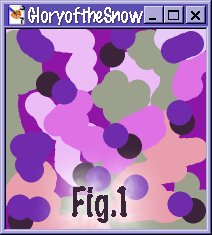
Look at mine. lol
3. Now let's DO
something with it ;) We'll click on
"Effects", "Textures",
"Tiles" and use the following
settings:(fig 2)
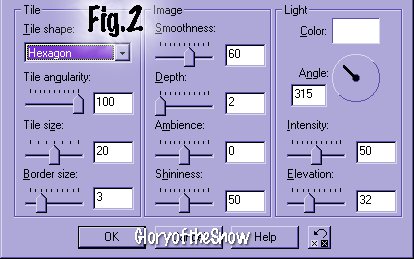
Now that looks
cool ;)
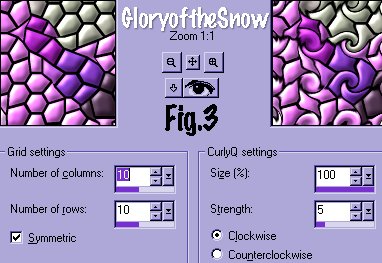
4. Let's do some
more! We'll click on "Effects",
"Geometric", "Curly Q's", with the following
settings: (fig3)
5. Let's click on
"Effects", "Reflection",
"Kaleidoscope" with the following
settings: (fig 4)
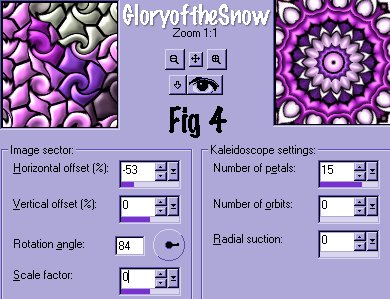
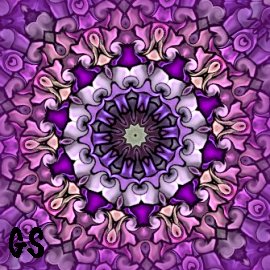
Pretty fun aren't
they! Just by changing the settings in each step,
like instead of using an odd shaped tile, use a
square one, or change the number of petals (with
just the slightest adjustment to the
"Rotation Angle in the Kaleidoscope effect,
the change is very dramatic!) .....we come out
with completely different results. No two are
exactly the same :)
You can make them
into tiles, use them for pattern fills... you're
only restricted by your imagination.
Betcha can't make
just one ;)
I hope you enjoyed
this quick and easy method of making kaleidoscope
patterns :)
Drop me a line if
you like, and let me know how you made out. If
you have any questions or problems, don't be shy.
If you'd like to
send in your work, I'd be honored to view what
your end result was :) Happy PSP'ing!!

Click on
"home" to take you to the main index.
You can e-mail me HERE.


The
contents on this site are the ©2001-2002
property of GloryoftheSnow. Please do not take
anything from the pages of this site for any
reason, or otherwise distribute or publish them
in any manner, electronicaly or otherwise,
without permission of the author.
|