We will begin with a simple program.This is a simple program printing an output
on the CONSOLE(Similar screen to MS-DOS).
|
/* program starts */ #include main() { printf("This is an example.\n"); printf("What is your name.\n"); } /* program ends */ |
In the above program #include
|
/* program starts */ #include main() { int a = 10; float b = 10.50; char c = 'a'; printf("%d,%f,%c",a,b,c); } /* program ends */ |
Here we have some new terms ,C allows to assign values to names called variables.These variables, we will use to create our programs.Also it is fairly easy to use names than the values itself. Now, we have a new printing format . we will explain that later. How really is this assignment process works? let us see that first. Check the figure below!
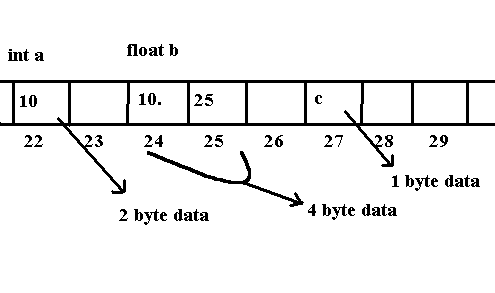
The above image gives the correct pictutre about the position of Variable.The memory is consecutive sequence of addresses in which sizeof of int(integer) is 2 bytes ,float(floating point number)is 4 bytes. char(character)is one byte.I assume ,the reader is familiar with the term bits,bytes,etc. There are some other types which we will discuss later,but, these are the types you will be working frequently.
End of Tutorial
