It�s a program within the game that generate a random number (from 0 to 100 in the case of FE6 and7) whenever an action involving varies results is taken.
What does it do?
The RN decide the result of the action taken, for example, when attacking and enemy, whether you hit or miss, pull off a critical hit or not, is all up to what the RN is. If the HIT display for your character is 78%, and the random number is less than 78, it�s a hit, otherwise it�s a miss.
How do you use it?
One of the most *popular* use of RN would be to gain better leveling up and this is when the Growth Rate chart comes in handy. Take Lyn as an example, with growth rate of HP70, Str40, Skl60, Spd60, Def20, Mdef30, Luck55, time your moves right and level her up when all 7 RN are less then 50then HP, Skill, speed and luck will definitely go up by one and better chance for the others to grow as well. When attacking it use up three RN if hit or 2 when miss, pulling off a One-hit KO for Assassins cost 4 RN, healing, using items, dancing and singing doesn�t cost any RN. The enemy movements costs the same but there are extra RN usage for the computer to �think� of its moves.
How do you find out what the RN is?
Using the method I�m about to explain can NOT give you the exact value of the RN but it can determine if that number is more or less than 50 (or some value around). It�s said it�s possible to find the exact value by hacking into the rom but I don�t know how to :p. To start off, you need a unit with and odd number of move range and without any obstacle within the surrounding 9 squares (no trees or anything that might slow down that unit), it�s often a good idea to use flying units since most landscapes don�t stop/slow them from moving but it takes longer to get the number. To find out the RN one of the most annoying/challenging feature of the FE games-- the auto save--is used. Every move done by the player is saved but if you only select the unit and draw the moving path (the blue line) then press B to quit it�s not counted as a move and would not be saved. With this we can find out all the RN starting from the last saved move, reset, and choose the right set of RN to use.
Start with selecting the unit you are using to find out the RN, the movement range appear as the blue area, now move the cursor to one square next to the unit then go either clockwise or anti-clockwise within the 9 squares surrounding that unit, move until you reach the limit of that unit�s movement range and then move one more square and the path line would be redrawn. The new line is what we are looking for, starting from the unit, if the line goes vertically first, the RN is less than 50; if it goes horizontally first the RN is more than 50. After finding one RN you can continue on with that unit and keep on drawing move path to find more RN. Record the RN somewhere and after you find enough of them, reset and try using the smaller RN when leveling up. REMEMBER not to make any moves that would make the game save automatically.
Note to reset the game quickly try A+B+Start+Select.
Here is an example of how to find the RN:
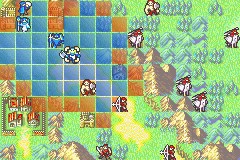
1. Select a character that can be use to find the RN (Hector in this case with nothing in the surrounding 8 squares stop/slowing down him)
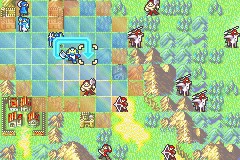
2. Draw the movement path around the character so the maximum amount of space you can move is reached as shown in the pic.
|2|3|4|
|1|h|5|
|=|=|*|
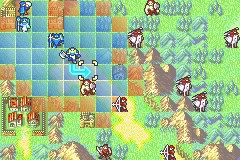
3. Move one more space (*) so the path is re-drawn.
4. Now look at this new path, if it gose vertical first (as in the pic), the RN is less than 50, if it goes horizontal first the RN is larger than 50.
5. Repeat step 1~4 until you got enough RN.
6. Reset the game, use the set of RN you want by calculating which ones are good for leveling up and arrange your move/use up the RN you don't want.