| Mirc Colour Help |
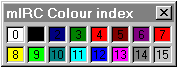
| Whilst mIRC program is open Basic Text Colours Press down ctrl key press letter k type number (0-15) type text (your message) BackGround Colours Press ctrl button plus letter k Type selected number, comma, and selected number Type in your text Bold Text Press down on your ctrl button ,press your letter "b". You will see a black box appear Type in your text Bold Text with Colour Press down on your ctrl button , press your letter "b" Press down on your ctrl button , press your letter "k" Select a number (0-15) colour code as you did with the basic colour foreground. To add a background colour, select another number and separate it from the first number with your comma. Type in your text Underline Text Press down on your ctrl button , press your letter "u" Type your text message |
 |