Autotelicum
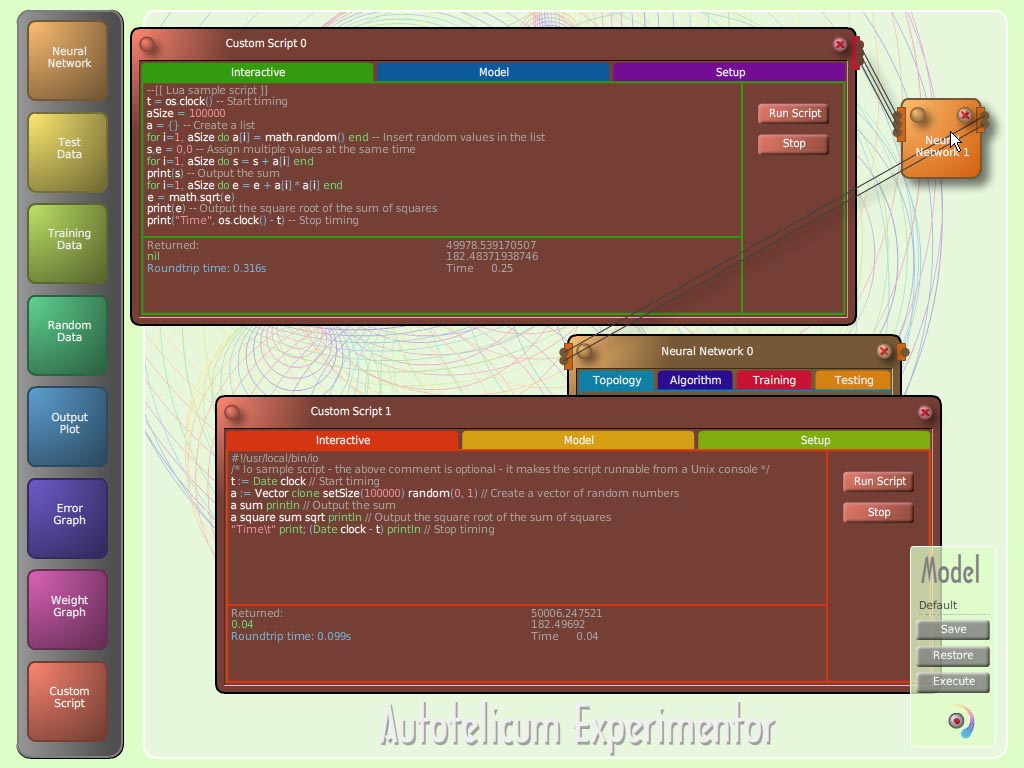
Here
is a screen shot of Autotelicum Experimentor, the successor to
fannExplorer. It features multilanguage scripting, currently Lua and
Io are implemented. Work has been done on integrating scripting
in Python and C++ as well, but they are more difficult languages to
integrate into a multithreaded, multiuser kernel, so it is uncertain
whether they will be present in a release version.
Scripts and other components can be connected in
models with simple drag and drop. A script written in one language
can feed a neural network with data during training of it. Another
script – maybe in another language can post process the output
of the neural network. A callback script can also be used to
determine when a neural network should stop its training. Multiple
neural networks can be chained so each can have a simpler task to
accomplish. Output can also be routed to graph components. It currently
uses a breadth first derived graph algorithm to figure out the execution
order. It is intended to enhance this so independent scripts and neural
networks can be identified and executed in parallel.
The use of Autotelicum Experimentor is not
restricted to neural networks. It can be used to experiment with
scripting tasks and languages in general. Possibly it is a first to
have a syntax highlighting script editor and execution environment on
a web page - it would be nice to know of anything similar. The
Experimentor is written in ActionScript 3. All GUI elements (windows,
buttons and fields) have been written from scratch because the Adobe
Flex MXML components are too high level and bulky for anything but
the standard enterprise application types they were designed for.
Fortunately the next version of the Adobe Flash authoring environment will
come with an improved set of components. The ActionScript 3 engine in
Flash Player 9 is awesome: all the graphics in the Experimentor are vector
based to keep the size of it slim. The little bubble buttons
were created with a matrix gradient box fill and a drop shadow filter to
fake the 3D look. The rainbow colored circle patterns in the composition
area are randomly created at startup based on a Lorenz attractor algorithm.
The colors are not just grey and blue - like it or not.
The scripts shown in the
screen shot corresponds to the following similar versions:
|
Mathematica (0.2s)
|
Python (0.7s)
|
C++ (Cint interpreter 0.3s, VS C++ compiled 0.03s)
|
|
t = AbsoluteTime[];
a = Table[Random[],
{100000}];
Total[a]
Sqrt[Total[Map[#1 #1 &,
a]]]
AbsoluteTime[] - t
|
import time
import random
import
math
t=time.clock()
a=[random.random() for i in
range(1,100000)]
def add(x,y): return x+y
print(reduce(add,
a))
def square(x): return x*x
print(math.sqrt(reduce(add,
map(square, a))))
print(time.clock()-t)
|
#include <cstdlib>
#include
<cmath>
#include <ctime>
#include
<iostream>
#include <valarray>
using namespace
std;
void main()
{
clock_t t = clock();
srand(static_cast(time(NULL)));
double randScale = 1.0 /
(double)RAND_MAX;
static const size_t aSize = 100000;
valarray a(aSize);
for (size_t i = 0; i < aSize;
++i)
a[i] = (double)rand()*randScale;
cout
<< a.sum() << endl;
cout <<
sqrt((a*a).sum()) << endl;
cout << (clock() -
t) / (double)CLOCKS_PER_SEC << endl;
}
|
|
Io (0.04s)
|
|
t := Date clock
a := Vector clone setSize(100000) random(0,1)
a sum println
a square sum sqrt println
(Date clock - t) println
|
The screenshot now shows Io with the Vector addon built into the kernel.
Thanks to Steve Dekorte (the primary author of Io) the already impressive time can be
improved more than ten times if you happen to have a Mac PowerPC.
One might expect that a better time could be obtained for Python by using the numarray
extension but loading the extension takes so long it does not make sense to use it for
simple calculations such as these. A good reason to use Python is the breathtaking number
of extensions available - for Windows most scientifically relevant extensions have been packed
together in the Enthought Edition - a 130Mb download - quite a size for a 'little' language.
All times were obtained on an 800MHz Celeron laptop with 256Mb RAM running Windows XP.
For a comprehensive benchmark see 'The Great Computer Language Shootout Benchmark'.
On Windows a sample C# implementation is faster (0.013s) than even the compiled
C++. The reason for this is that C++ uses the C random number generator, which needs to keep its
state in a static variable. To be thread safe the static variable needs to be in thread local
storage, which adds overhead to the execution time. Implementing a small random number class in
C++ where the state is kept in a private member variable and using loops with pointers reduces
the C++ time to 0.01s well below C#�.
Among the interpreted languages Io has a very simple syntax and plenty of builtin functionality making it
very quick for writing a program, so if you spend more time writing a program than running it,
then Io could be the right choice. As a young language Io does yet have the stability of Lua
which is in its fifth major release. With Lua you have to write at a rather low level almost like C
but then it also performs respectably. The Lua interpreter is reentrant and can be called from any
thread, which utilizes the processor resources better than for instance Python that sets up a global
interpreter lock and then pseudo multithreads internally with task switching every 100 byte codes.
The Autotelicum kernel is written in portable C++, currently it uses SOAP to
communicate with the frontend just like fannKernel, but experiments have been conducted to convert
into binary data transfers for additional speed. Some of the scripting languages (LuaJit and UnderC)
emit x86 assembly code, so the runtime environments are currently planned to be Windows XP/Vista,
Mac OS X and Linux on x86 compatible processors.
As the autotelic name implies all of this is done just because it is fun to program.
Should you have comments then you can make contact at freegoldbar at yahoo dot com. Please understand
that everything shown here is under development and may change shape and direction many times before
a release which is still quite some way away (updated January 14th 2007/2550).
If the wait seems long then have a go at the DeathStacks game.
Go back home.
Footnote 1: C# is something to consider for production applications that only need to run on Windows (some portability
exists with Mono) and where programmer productivity is a factor (faster compiles and easier syntax than C++).
The .Net framework used by C# also features internationalization beyond most other environments.
It does not just support Unicode in strings as many other languages do. It supports localized digits
in for example Thai and Arabic with format.SetDigitSubstitution(culture.LCID, StringDigitSubstitute.National)
and localized calendars with now.ToString("F", culture) which is great for the majority of the world
for whom Christianity is superstition�. Switching between cultures only require a line like:
culture = new CultureInfo("th-TH") for Thai where this year is 2550 after Buddha. Substitute:
"ar-SA", "ja-JP", "sa-IN" or "zh-CN" for arabic, japanese, indian and chinese among many other
cultures that should be treated equally whether one believes in the local religion or considers it superstition.
Obviously the localization only works if appropriate fonts are installed. The .Net languages also support
writing program source code in one's own language - rather than being forced to write in English - which is neat
for programs that are not going to be shared internationally.
Footnote 2: Quote from the superstition article in Encyclop�dia Britannica: "Often one person's religion is another
one's superstition: Constantine called paganism superstition; Tacitus called Christianity a pernicious
superstition; Roman Catholic veneration of relics, images, and the saints is dismissed as superstitious
to many Protestants; Christians regard many Hindu practices as superstitious; and adherents of all �higher�
religions may consider the Australian Aborigine's relation to his totem superstitious. Finally, all
religious beliefs and practices may seem superstitious to the person without religion."