NOTE: The following cheats require the trainer and a good Hex Editor like UltraEdit32 or Hex Workshop. Personally I prefer Hex Workshop.
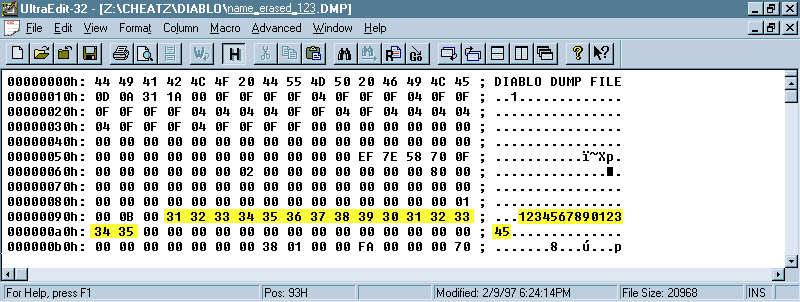
The first thing you need to know if you want to learn how to dupe items using Hacker Diablo Trainer is how to Hex Edit the name of the character in the *.CHA files the trainer creates. In the picture below I have taken a screen shot of a *.CHA file from one of my characters and highlighted both the Hexadecimal area, and the ASCII area that make up the name. As you will notice this character is named "123456789012345". This is the maximum length of a name for a Diablo character. You will also notice that the name begins at hex offset 0000 0093H and ends at offset 0000 00A1H. If you would like, the small picture below is a link to a full size screen shot so that you can see the numbers clearly.
1.) Load the *.CHA file into your favorite hex editor. (For Example, I have loaded one of my characters into Ultra-Edit 32 to produce the above screen shot).
2.) Find the beginning of the character's current name on the ASCII (normal text) side of the editor.
3.) Type the new name over the old name. (For Example, if the new name I wanted to give this character was "Dudeman", then I would click in the ASCII side right in front of the number 1 as that is the first letter of the name "123456789012345". Then I would simply type "Dudeman". This will produce and ASCII side that will have a name like "Dudeman89012345").
4.) If the name new name is the same length as the current name then that is fine. If the new name is shorter than the old name then you must click in the HEX side of the editor and right after the value corresponding to the last letter of the name you must enter the value of 00. (For Example, Above we wanted to change the name "123456789012345" to "Dudeman", but right now it comes up as "Dudeman89012345". So what we do is click in the HEX portion of the editor right before the value 38 which is the HEX value for the ASCII 8. We then change that 38 to 00. This tells Diablo that the "n" in "Dudeman" is the last letter and anything after that in the name area can be ignored).
This is actually very easy. It works great for when you finally get that really good Obsidian Ring of The Zodiac, but you want one for the other hand. Or you have that nice KS of Haste and you want to keep it, but you need one for a trade. Here is what you do.
1.) Start a Local Area Network game with your character.
2.) Save your character using the trainer
3.) Drop any items you want to copy on the ground by your character.
4.) Use the trainer to restore your character. Now you have your character back with all his items and you have the items you dropped on the ground back in step 3.
Simple wasn't it.
Ok, so you've cloned someone from Battle.net. You checked out their character and they have some nice items you would really like to give to your own character. Problem is that you then have to rely on people on battle.net while you join a game with the clone, Drop the items you want to give your character, leave battle.net, reconnect to battle.net with your character, and then rejoin the game you dropped the shit in. This is a most unreliable process at best. Some of the items might turn up missing when you rejoin the game. Someone might have stolen the items you dropped. Hell, the people in the game might all leave for one reason or another. Here I show you a much more reliable method for moving items around between characters and for duping items from the clones you make.
1.) Decide which character you want to give the items to. (For Example, I want to give some items from a clone to my character named "Death_Rider"
2.) Find the *.CHA file for the character whose items you want. (For Example, I want the items to come from a character named "Castro").
3.) Use the instructions from above to Hex Edit the name in the *.CHA to match the name of the character you want to give items to. (For Example, I will Hex Edit the *.CHA file containing the information for "Castro" and change his name to "Death_Rider").
4.) Start a Local Area Network game of Diablo with the character you want to give items to. (For Example, I will start a game using my character "Death_Rider").
5.) Use the trainer to save your character. (For Example, I will use the trainer to save my character "Death_Rider").
6.) Now restore from backup using the *.CHA file with the name you changed. (For Example, I will now restore the *.CHA for "Castro" whose name I changed to "Death_Rider").
7.) Drop all the items you want to give to your character on the ground. (For Example, I will now drop all the items that "Castro", whose name I changed to "Death_Rider", had on the ground that I wanted.)
8.) Restore your character from the backup you did in Step 5. (For Example, I will now restore the backup I made of "Death_Rider" in Step 5).
9.) Pick up the items you had the clone drop. And off you go with all new items for your character.
Back to BoBaFeTT Trainer Page.
Page Created 19 February 1997 4:00PM Australian Standard Time
Last Modified 25 September 1998 11:00PM Australian Standard Time