General Advice

Firstly, never, ever confuse HTML attributes with CSS properties. They're usually different although they may refer to the same thing essentially. For example, bgcolor goes with <body> as an ATTRIBUTE but if you'd like re-define <body> in CSS, you'll have to use BACKGROUND-COLOR. As though it's not irritating enough, only American spellings of the word 'colour' is accepted. So use COLOR but not COLOUR.

Remember to name your slices whether you're using Fireworks or ImageReady. Don't expect the programs to do it for you. or you'll get a blank image.

Don't spend too much time in front your computer!!!!!

top

Photoshop Tips

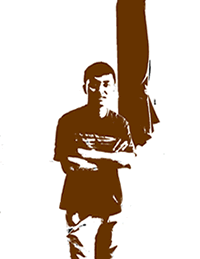
1. How to make the photo effects on this site.

Step 1. Load the photo you want in Photoshop.

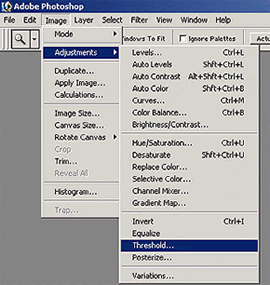
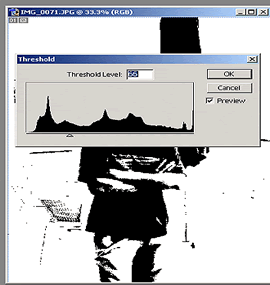
Step 2. Go to Image>Adjustments>Threshold.

Step 3. Move the anchor to the left till you get a satisfactory image.

Step 3. Use the Paintbucket Tool to colour the image.

top

CSS

Fancy one those of navigation menus where clicking on one item brings out a submenu? I've done a bit of CSS coding to achieve just that. Here's what you'll get.

Here's the code for it.

.main
{
font:12 pt Tahoma;
color:#882200;
background-color:#cc6600;
border:solid 1 black;
position:top;
visibility:visible;
}

.submenua
{
font:12 pt Tahoma;
color:blue;
visibility:hidden;
}
.submenub
{
font:12 pt Tahoma;
color:blue;
visibility:hidden;
position:relative;
top:-1.3em;
}
.submenuc
{
font:12 pt Tahoma;
color:blue;
visibility:hidden;
position:relative;
top:-2.6em;
}

And the HTML.

<div class="main"> <a onClick="submenu1.style.visibility='visible', submenu2.style.visibility='hidden', submenu3.style.visibility='hidden'">
link 1 </a> : <a onClick="submenu2.style.visibility='visible', submenu1.style.visibility='hidden', submenu3.style.visibility='hidden'">
link 2 </a> : <a onClick="submenu3.style.visibility='visible', submenu2.style.visibility='hidden', submenu1.style.visibility='hidden'">
link 3 </a> </div>
<div id="submenu1" class="submenua" style="visibility:hidden">a 1:
a 2: a 3</div>
<div id="submenu2" class="submenub" style="visibility:hidden">b
1: b 2: b 3</div>
<div id="submenu3" class="submenuc" style="visibility:hidden">c
1: c 2: c 3</div>

The tricky bit is to align all the submenus such that they appear in the same place. I did this by relative positioning and experimenting with the shift in the top margin. The problem is that there isn't a direct conversion between the font size and the length, so it's got to done by trial and error.


Hosted by www.Geocities.ws

1