
Home | Software | Practical Jokes | Code Corner | Workshops
|
Digi-Pad v1.0
( Download Now )
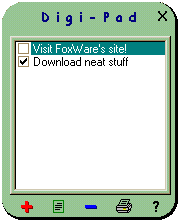
Digi-Pad is an electronic notepad that sits right on your pc screen. This offers instant access to notes that you have written and eradicates the search for scratch paper. Digi-Pad even comes in two different modes. You can have it visible to remind you of upcoming events. Or you can hide it so only an icon appears in the bottom right corner of your screen. Digi-Pad is there when you need it and away when you don't, making it the ultimate in personal management. | |
 |
- F E A T U R E S - * Great for grocery or shopping lists! |
|
Create, Edit, and Remove notes With Digi-Pad, it's easy to create ( |
|
|
"Hide" mode In order to keep your pc screen uncluttered, Digi-Pad offers a "Hide" option. By clicking on the "X" in the upper right hand corner, this will activate the Hide mode. The digi-pad will then disappear and only the icon in the bottom corner of your screen will be left. To reopen Digi-pad, simply click on the icon and instantly it reappears! |
|
|
Fully customizable print settings Since you will want to bring your notes with you at times, Digi-Pad offers a customizable print feature. By clicking on the print ( |
|
|
Changeable color scheme If you're someone who likes a little spice in your life, you'll want to check out the options ( |
|
|
Installer included To keep the use of Digi-Pad as easy as possible, a program installer is included. Once you unzip the downloaded file, run the 'Setup.exe' file to automatically install your new Digi-Pad program. |
|
|
Low resource usage Since Digi-Pad is something that you will want running continually, it is important to have it use a minimal amount of PC resources. The entire design and planning of Digi-Pad went into making it run as smooth and quick as possible. This allows you to enjoy the benefits of Digi-Pad without slowing down your PC. |
|
|
Download Digi-Pad v1.0
|
|
 ),
edit (
),
edit (  ),
or remove (
),
or remove (  ) a note using the convenient
shortcut images. To create a note, simply click on the red plus. A new screen will
appear asking for your note. To edit or delete a note, first place a check in front of the
note you want to modify. This can be done by clicking on the checkbox to the left of the note.
) a note using the convenient
shortcut images. To create a note, simply click on the red plus. A new screen will
appear asking for your note. To edit or delete a note, first place a check in front of the
note you want to modify. This can be done by clicking on the checkbox to the left of the note.
 ) shortcut,
the printing options screen will appear and you can specify what settings you
would like. These include: which notes to print, font size, color, and even bullet
style.
) shortcut,
the printing options screen will appear and you can specify what settings you
would like. These include: which notes to print, font size, color, and even bullet
style.
 ) shortcut. From there
you can modify the color scheme of Digi-Pad. There are 7 background colors
and 4 font colors to choose from giving you enough variety to last all month.
) shortcut. From there
you can modify the color scheme of Digi-Pad. There are 7 background colors
and 4 font colors to choose from giving you enough variety to last all month.