ForceASPI is a suite of scripts designed to install the latest Adaptec ASPI layer on your Intel x86 (or compatible) 32bit Windows operating system.
The scripts which make up ForceASPI will automatically detect your operating system and install the appropriate files correctly. The following operating systems have been (briefly) tested...
These are the main reasons I created ForceASPI and why you might want to use it...
Simply extract the .ZIP file to a directory somewhere. Open a
Command Prompt and run the appropriate .BAT file(s) as required.
Here is a brief description of what each script does.
InstASPI - Installs Adaptec ASPI layer version 4.72 on Windows 98, ME, NT,
           2000, and XP. Installs Adaptec ASPI layer version 4.60 (1021)
           on Windows 95. Any existing ASPI Layers will be overwritten.

DumpASPI - Creates a backup of your existing ASPI layer, or parts thereof.
           Some Win32 operating systems do not have an ASPI layer, in this
           situation you will create an empty backup.

RestASPI - Restores the ASPI layer backup created with 'DumpASPI'.
           WARNING! If your ASPI backup is empty, RestASPI will completely
           erase your currently installed ASPI layer.

KillASPI - This will completely remove your currently installed ASPI layer.

KillDUMP - This deletes your dumped ASPI layer.
I would recommend that you use ForceASPI in the following way...
DumpASPI to backup your current ASPI layer
InstASPI to install the new ASPI layer
ASPIchk to see if everything worked OK ForceASPI is Freeware. You agree to use ForceASPI at your own risk. I will not be held responsible for any loss of data, damage to hardware or loss of earnings as a result of using any of the files distributed in this package.
ASPIchk.exe is a tool provided by Adpatec to report what version
of the ASPI Layer you have installed. It also checks if everything is working OK.
To test your ASPI Layer with ASPIchk.exe, just download it, and then run
it.
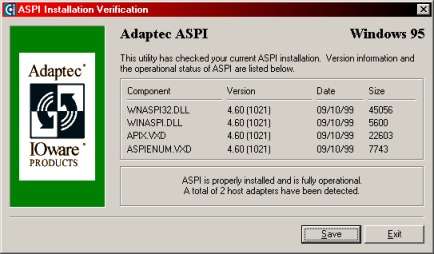
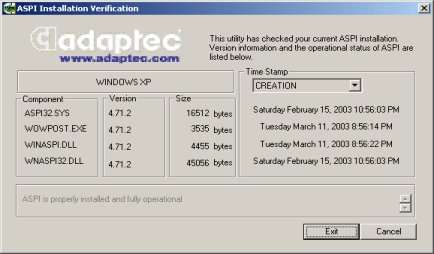
Here are some example screenshots of what ASPIchk should look
like after a successful install. NOTE! The number of Host Adapters
detected is dependant on your hardware configuration.
