 |
|
|
|
|
|
|
|
|
|
|
|
|
|
|
|
|
|
|
|
|
|
|
|
| Want Music in Your Shop? |
|
|
|
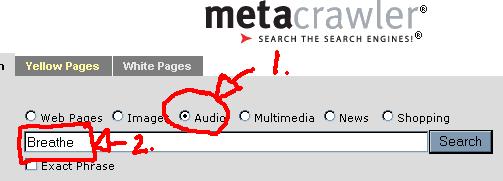
First, go to this website:
www.metacrawler.com
And then follow the steps below! |
|
|
|
 |
|
|
|
Step 1: Select the 'Audio' button above the search bar.
Step 2: Type the name of the song you wish to find into the search bar, and click search. |
|
|
|
 |
|
 |
|
|
|
|
|
|
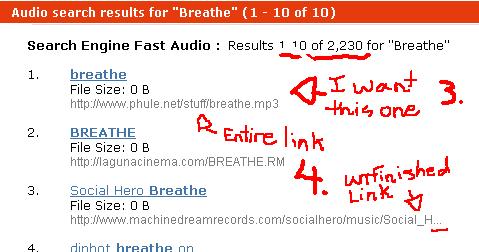
Step 3: Go through the results that come up untill you find the version you would like to have in your shop.
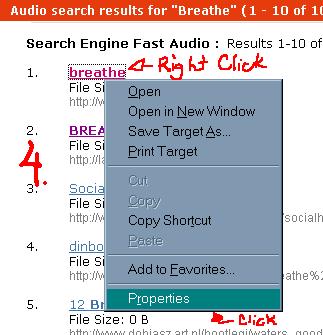
Step 4: If underneath the link to the song is an entire link (does not end in '...'), then skip to Step 6.
If the link is unfinished, right-click on the link to the song, then click on 'Properties'. |
|
|
|
 |
|
|
|
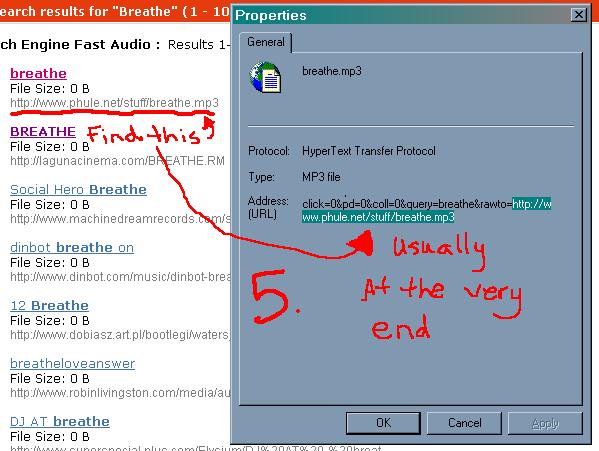
Step 5: Highlight the address that is shown beside "Address:" and scroll down untill you see the link to the song. It is usually at the very bottom, and will end in a sound file tag (ie: .mp3, .midi, .rm, etc.).
Step 6: Copy and paste this link into the html of your choice, and then copy/paste into your shop! |
|
|
|
Music will play once, then stop. |
|
|
|
Music will replay infinitely. |
|
|
|
|
|
|
|
|

|
|