
The Stockmarket is located in the games section, at the bottom. Click Here to see!
You will see a bunch of links at the top; basically the only ones you need to worry about are "Find Stocks" and "My Portfolio". "My Portfolio" will take you to a page which shows what stocks you currently have, and "Find Stocks" we will use to buy stocks!
To buy stocks, click on the "Find Stocks" link. It will take you to a page, then click the link given to see the full list of stocks. Here you will be shown a large table, with 7 columns. These columns are Logo, Ticker, Company, Volume, Open, Curr, and Change. I'll explain these in a bit. Here is what the table looks like:
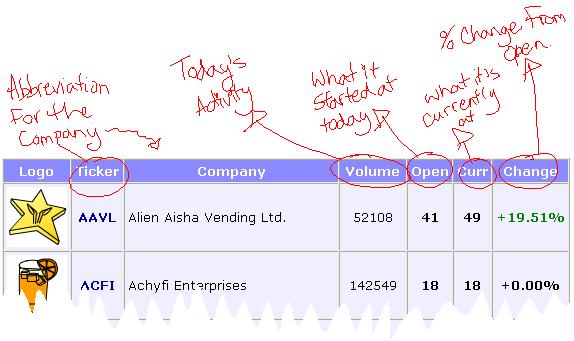
Ticker: Each company chooses a 4-letter abbreviation of the name to represent it, to use for buying and selling the stocks.
Company: This is the name of the company.
Volume: This is the number of transactions which have taken place with this stock today, basically, how many people have bough/sold some of this stock.
Open: This is what the stock started out as this morning.
Curr: This stands for Current, it is what the stock is currently at. The number represents what a single share of the stock is worth. Ex: if a stock is at 20, each share is worth 20np, therefore, purchasing 1000 shares would cost 20,000np.
Change: This is the percent change from what the stock opened at.
Buying Stocks: The whole point of the stocks is to sell them when they're worth more than what you paid for them. Go to view the full list of stocks, and look under the "CURR" column for stocks which are at 15; 15 is the lowest that you can purchase stocks. Also pay attention to the Volume, if you see a stock at 15, and there have been over 3million transactions, I will usually try to buy some of it. If there is more than one stock at 15, go by the Volume, whichever has the most transactions, choose it... always try to buy 1000 (the maximum daily amount), but sometimes I will buy 500 of one, 500 of another. it all depends on what the stocks are like.
Selling Stocks: Wait for your stocks to go up. Don't worry if they go down, stocks will usually spend most time being worth less when they're not going up. If your stocks go down, there's only one way they can go, UP!
Go to "My Portfolio", there you will see the stocks that you own, in yet another table.
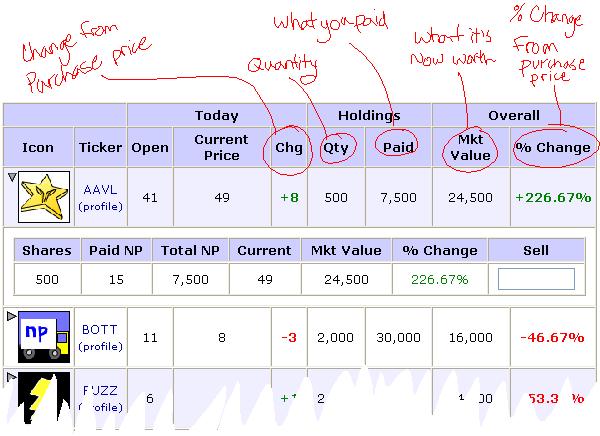
Current Price: This is what the stock is currently at.
Chg: This stands for Change. It is the difference between your purche price and the current price.
Qty: This stands for Quantity. It is the amount of shares of the stock which you have purchased.
Paid: This is what you have paid for your shares.
Mkt Value: This stands for Market Value. It is what you would get if you were to sell your shares at that moment.
% Change: This is the percentage of change between your purchase price and the current price.
As seen in the image above, clicking the triangle beside the company's logo will bring down another part for that particular stock, where you will be able to sell them. Type into the text box the number of shares which you wish to sell.
When to Sell: Sell (obviously) when your stocks are worth more than what you paid for them. Wait until your % Change is at least +30%. I reccomend holding out for +130% or higher, then selling. If it looks like the stock will continue to rise, hold it for longer. As you can see in the above image, the stock "AAVL" is at +226.67%; I sold half when it peaked at +300%, and held the other half incase it would go up further. When you sell is entirely at your discretion, I can only give you tips and guidelines.
