|
Easy Snow Globe
Continued
Click on your picture layer on the layer palette to make
it active, click on your magic wand and click on the
transparent part of your image outside the globe.
Selections/Invert you will have ants around your picture
only. Shift+D 3 times for a total of 4 images.
Click on your arrow or pan tool and click once on the first
image to make it active, Effects/Plugin Filters/VDL Adrenaline/
Snowflakes and use these settings.
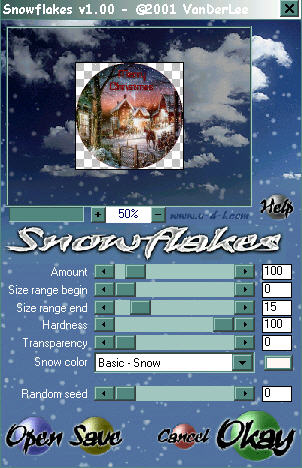
Selections/Select None
On the layer palette merge/merge visible all layers
except the background layer.
Apply a drop shadow with these settings..
V&H = 4
Opacity = 50
Blur = 11
Color = black
Click on the background layer on the layer palette
Flood fill with white then merge all layers visible.
Using your magic wand click on the white part
then hit the delete key this will remove the white
around the image. Selections/Select None.
File/Save and name your image snowglobe1
Repeat the above in green for snowglobe2, 3 and 4
changing the random seed to these settings.
Snowglobe2 change random seed to 2400
Snowglobe3 change random seed to 5200
Snowglobe4 change random seed to 9999
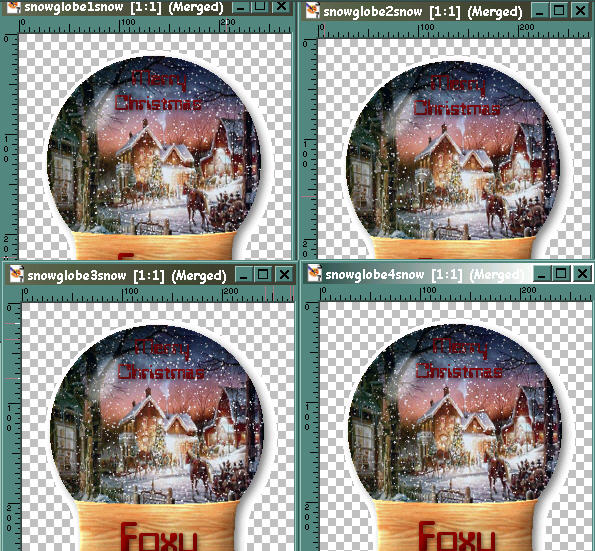
Once you have done all 4 images then open Animation Shop
Normally we would use the animation wizard but we will
copy them instead.
In paint shop pro using the arrow or pan tool right click
on snowglobe1 image and choose copy, in animation shop
right click and paste as a new animation. Back to paint shop
pro right click on snowglobe2 and choose copy, in animation
shop right click on frame 1 and choose paste after current frame.
Go back to paint shop pro and right click on snowglobe3 and copy
in animation shop right click on frame 2 (scroll over if needed)
and choose paste after current frame. In paint shop pro right
click on snowglobe4 and copy, in animation shop right click
on frame 3 and paste after current frame.
This is what you should have..
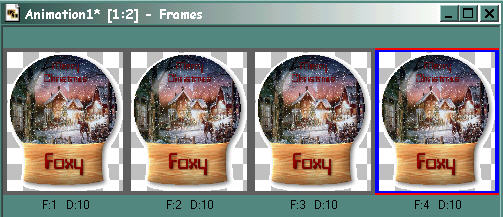
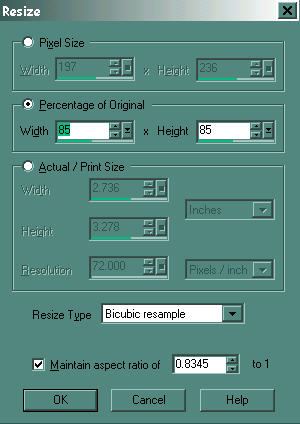
View your animation and if your happy with it choose
at the top Animation/Resize Animation & use these settings.
File/Save, name your new snowglobe
and your all done.
©Foxy's Creations 2004
|