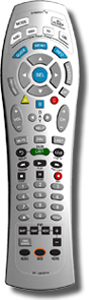
Programming Devices into the Synergy V Remote:
Note: These instructions assume you have already selected the proper device code(s).If you are programming a cable set top box, skip steps 4 and 5 and press SELECT to lock in the code.
1. Turn on the device you want to program.
2. Press SELECT and MUTE together until the mode buttons light up in slow rotation.
3. Enter in the 3 digit codes for the component one at a time on the remote until the device
turns off.
4. Press MUTE. If the device turns back on, press SELECT to lock in the code.
5. If the device does not turn back on after pressing mute, try other codes until the
device comes back on. Then press SELECT.
Programming Volume Lock:
1. Press CBL and SELECT together until the CBL button illuminates.2. Press VOL + and CBL. The CBL button will blink 3 times and go out.
3. To return volume control to the TV repeat step 1, then press VOL + and TV.
Programming For TV/VCR:
1. Turn on the TV/VCR and insert a VHS tape.2. Next, program the remote to operate the TV functions using the instructions above for the
TV codes.
3. Finally program the remote to operate the VCR functions using the instructions above for the
VCR codes.
Automatic Search for Codes:
1. Turn on all the electronic devices you want the remote to operate.2. Press SELECT and MUTE together until the mode buttons light up in slow rotation.
3. Press and hold the CH + button until one device turns off. Release the CH + button.
4. Press MUTE. If the device that turned off turns back on, press SELECT to lock in the code.
If it does not, Press the CH - button until the device turns back on.
Press SELECT to lock in this code.
5. Repeat steps 2-4 to program each of the remaining devices.
Resetting the Remote:
1. Press CBL and SELECT together until the CBL button illuminates.2. Press the SETTINGS button twice. The CBL button will blink 3 times and go out.