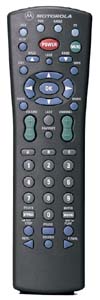
Programming Devices into the Motorola DRC400 Remote:
Note: These instructions assume you have already selected the proper device code(s).For programming TV/VCR combo, refer to "Programming a TV/VCR Combo"
at the bottom of the page.
1. Press and hold the mode button to be programmed (TV or VCR) until the 4
mode indicators flash twice.
2. Enter in the 4 digit code for the device.
3. The mode button should flash 3 times. If it doesn't, repeat steps 1-3 with the same code.
4. Point the remote at the device and press POWER. If the device turns on and off, the
remote is programmed correctly. If not, try other codes if available.
Programming Volume Lock:
Note: If you change the volume lock setting to TV or Cable mode, the volume controlfor all modes except AUX will be changed. Or, all modes will be controlled by the AUX mode if you
change the volume lock setting to AUX. It is recommended to NOT do this for the VCR key.
1. On the remote control, press and hold the appropriate mode key until the 4 mode keys blink twice.
2. Press the Volume + button and release it.
3. The mode key will flash 3 times. The volume has now been unlocked for that key.
Programming a TV/VCR Combo:
Note: Some TV/VCR combinations may require a TV code to control volume.In this case, program the TV mode button with the TV code for the appropriate
brand of TV/VCR. If no TV code works, the volume will need to be set to be controlled
through the cable box (see "Programming Volume Lock")
1. Press and hold the VCR button until the 4 mode indicators flash twice
2. Enter in the 4 digit code for the TV/VCR using the TV/VCR selection from the list.
3. The VCR button should flash 3 times. If it doesn't, repeat steps 1-3 with the same code.
4. Point the remote at the TV/VCR and press POWER. If it turns on and off, the
remote is programmed correctly. If not, try other codes if available.