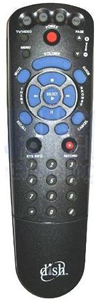
Programming Devices into the Echostar Remote:
Note: These instructions assume you have already selected the proper device code(s).
1. Turn the device's power on.
2. Press and hold the appropriate mode button on the Echostar remote.
3. Use the remote's number buttons to enter in the device code.
4. Press the pound(#) button. If you entered the code correctly, the mode button flashes 3 times.
5. Press the blank power button on the remote. If the correct code has been entered, the
device should turn off.
6. Try other buttons on the remote. If they work, stop here. Sometimes the power button
will work but other buttons will not. If they do not, try alternate codes using
the steps above.