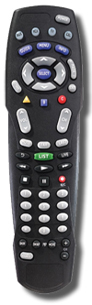
Programming Devices into the AT8400 Remote:
Note: These instructions assume you have already selected the proper device code(s).1. Turn on the device.
2. Press and hold SELECT plus the appropriate device key until all mode keys blink twice.
3. Enter in the code for the device. The mode keys should then blink twice if the code
was accepted.
4. Test the device by pressing POWER. If the device responds, the program was successful.
If the device does not respond, repeat steps 2-4 for other codes (if applicable).
To Program for Volume Control:
Note: The default device is TV. For controlling the volume through the cable box,press the Settings button twice to go into the "General Settings" menu and make sure that
the "Audio: Volume Control" setting is set to "Variable".
1. Turn on the device.
2. Press and hold the SELECT and CBL keys until the mode keys blink twice.
3. Using the remote keypad, press 9 9 3. The mode keys will blink twice.
4. Press the mode key for the device you want to control the volume.
5. Point the remote at the device and verify the volume is being adjusted through it.
To Program for Cable/Satellite Receiver:
1. Press and hold the SELECT and CBL keys until the mode keys blink twice. 2. Using the remote keypad, press 9 9 6. The mode keys will blink twice.
3. Press CH - to unlock the remote.
4. Enter in the 4 digits to program the CBL key.
To Search for Codes:
1. Turn on the device.2. Press and hold SELECT and the appropriate mode key until the mode keys blink twice.
3. Using the remote keypad, press 9 9 1. The mode keys will blink twice.
4. Point the remote at the device and press PLAY. The remote will now automatically test
each code in its library beginning with the most common codes. The mode key will
flash twice when it reaches the end of the codes stored in its library.
5. As soon as the device powers down, press the SELECT key.
6. Verify that the code is correct by pressing the POWER key.
7. If the device powers on again, press the SELECT key again to lock in the code.
If it does not, turn the device on and press CH + or CH - to step to the
correct code. When the device turns off, press SELECT to lock in the code.
To Identify Programmed Codes:
1. Press and hold the SELECT and CBL keys until the mode keys blink twice. 2. Using the remote keypad, press 9 9 0. The mode keys will blink twice.
3. Press 1 then count the number of times the mode key blinks. This will be the first
digit in the code. If the key does not blink the digit is 0.
4. Repeat Step 3 substituting 2, 3 and 4 to obtain the other 4 code digits.
5. Write down the code for future reference.