Example 1 |
|
| Solve
the linear system by using graphing. y-4=x y=2x+5 |
|
| y-4=x y=2x+5 |
y=x+4 y=2x+5 |
| Insert the equations | 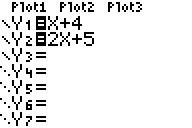
|
| Hit GRAPH | 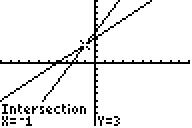
|
| Hit 2nd TRACE and ENTER 3 times |
|
| Answer (-1,3) | 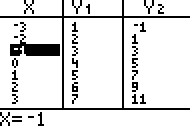 |
| You can solve systems of equations by graphing them on the calculator. | ||
| This is benefical when the equation is in y=mx+b form or it is easy to get into this form. For example y=5x+3 or 0=-y+5x+3. | ||
| The first step is to put the equations in y=mx+b form if not already. | ||
| The second step is enter the equations in the calculator. Hit the Y= button and then type the equations. Use the grey error buttons to scroll to the next line to enter the next equation. | ||
| The third step is to push GRAPH. If the graph is not shown on the screen adjust your screen by hitting WINDOW. | ||
| The fourth step is to find the solution of the equation. Hit 2nd TRACE (CALC). Then hit 5. Then hit ENTER three times and that is your solution. |
Example 1 |
|
| Solve
the linear system by using graphing. y-4=x y=2x+5 |
|
| y-4=x y=2x+5 |
y=x+4 y=2x+5 |
| Insert the equations |
|
| Hit GRAPH |
|
| Hit 2nd TRACE and ENTER 3 times |
|
| Answer (-1,3) | |