So you have a colored piece, and you want to do shading and highlighting the way I do?
For shading:
1. Create a new layer ABOVE you coloring. My coloring is usually on a whole seperate layer, but with certain photoshop artists, it's different. (shortcut key for creating a new layer is Shift+CTRL+N, enter)
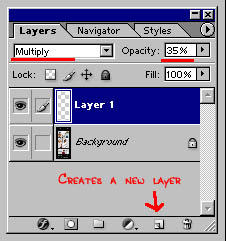
2. Set the layer to Multiply and the Opacity to around 35%. (see Picture 1)
3. Select black as your color and select the pencil tool (shortcut key B).
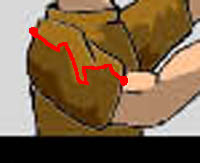
4. Now here is where talent comes into play. You will draw the edge of the shadow, as if the line was the clothing folds or bends of the skin/bone. (see Picture 2) Make sure the lines connect to the edge of the outline. Or else step 5 won't work.
5. Select the paint bucket as your tool. (shortcut key G) Make sure you have Anti-aliased, Contiguous, and All Layers selected with the tolerance at 100. (see picture 3) Fill in where the shadow would be. If there are areas you don't want to be shaded, make sure before filling it in, you have drawn an edge for the shadow to stop at.
6. That's all there is to it!
TIPS:
- If you can spare $100, go out and buy a Wacom Tablet. They are great for step 4.
- If you are using a mouse, and you want straight edge folding lines, click once with the pencil to creat the starting point of the shadow edge. Move to where you want the line to go to and while holding shift single-click the button on your mouse. This is also a fast and easy way to make zig-zag lines and folds.
For Highlights:
1. Select the Polygonal Lasso Tool (shortcut key L).
2. Select an area that you want to be highlighted.
3. Open up the Image Menu -> Adjustments -> Brightness/Contrast and set the brightness to 44. (or do what I do and hit Alt, I, A, C, 44, enter)
This same process can be used to give thicker, or extra, shading to a picture:
1. Select the Polygonal Lasso Tool (shortcut key L).
2. Select an area that you want to be shaded.
3. Open up the Image Menu -> Adjustments -> Brightness/Contrast and set the brightness to -44. (or do what I do and hit Alt, I, A, C, -44, enter)