(UPDATE: I'VE UPLOADED THE DEFAULT.ECW FILE FOR YOU TO DOWNLOAD).. Here's HowTo Make a Dos Bootdisk with Soundblaster Live and Audigy support as well as CD-ROM and Mouse for all your abandonware and all those old DOS games you have missed so bad and want to experience once again. It worked for me, I use it to play Privateer 2 and xcom etc.
Soundblaster Live support, Extended memory (EMM ONLY NO QEMM), and with CD-ROM/DVD
and MOUSE Drivers.
Step
1:
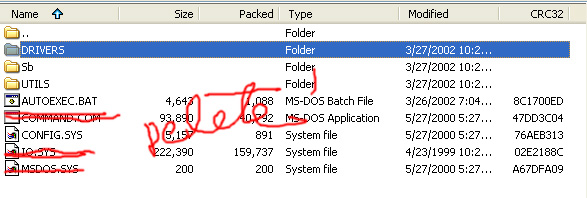
Download the DOS/Soundblaster Drivers and extract the files to a folder. So now you have the following files and folders:

Now make sure you have "Show hidden files" Checked on your Folder Options>View on the Tools menu to see all the files, on WinXP I think you need to Uncheck the "Hide Protected Operating System Files Option"(These are basically the system files). Delete the following files marked with red lines(IO.SYS, COMMAND.COM, & MSDOS.SYS)
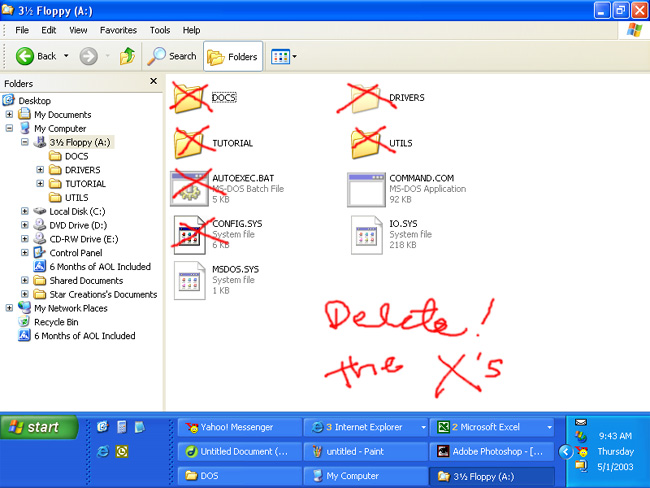
You take a Basic Working Dos Bootdisk (preferrably Windows 98 Startup Disk) If you don't have one download one here. After you have created the bootdisk, Explore the floppy drive with your Working Bootdisk and again make sure the "Show hidden files" option is checked or uncheck the "Hide Protected Operating System files" for winXP. Now delete all the files and folders (Marked in Red below) EXCEPT the three main system files (IO.SYS, COMMAND.COM, & MSDOS.SYS).
Now back to the Dos/Soundblaster
Drivers folder that you have downloaded. Copy the rest of the files from this
folder to the Working Bootdisk on the floppy drive, these include all the
folders, the autoexec.bat and the config.sys. Now you are done with the bootdisk.
Now go to step two to make sure you have all the drivers and files you need
on your Hard Drive to be able to make all of this to work.
Step 2:
You need this file DEFAULT.ECW (Downloaded from DriverGuide.com) .
Try looking for it on your C:\. I found it on DriverGuide.com and downloaded
it. The Soundblaster looks for this file (i believe it is also a driver file for both audigy and sb live for dos) when you bootup with the bootdisk
as it attempts to load its driver. And it looks for it on the C:\SBLIVE\,
so if you don't have this folder, create one and place the DEFAULT.ECW (Downloaded from DriverGuide.com) here
END
Also visit
this great Abandonware Site
DO
NOT copy
the IO.SYS, MSDOS.SYS AND COMMAND.COM from the downloaded drivers coz its
not
an
image download, coz i dont know how to do that, like wen you download a bootdisk
your
downloading
an application for making the bootdisk but not the actual bootdisk itself,
i don’t
know
how to do that. so you need to copy the files from the dos drivers except,
like I said, for the actual system
files
: IO, MSDOS, COMMAND.COM coz these files wont work
just
copy the rest of the files (including autoexec.bat and config.sys) to the
WORKING BOOTDISK that you have made or downloaded, preferably
WINDOWS
98 STARTUP DISK
It
is recommended to delete the ALL THE NON-SYSTEM FILES from the WORKING
BOOTDISK first before copying in theDos Drivers files to make sure there’s
enough space. (e.g. I deleted the QEMM file to free up space) .
SEARCH
YOUR C:\ FOR THE FILE DEFAULT.ECW THE SB16 EMULATION IS GONA
LOOK
FOR THIS FILE WHEN IT ATTEMPTS TO LOAD THE DRIVER.
THEN
MAKE FOLDER "SBLIVE" ON C:\ SO YOU SHOULD HAVE C:\SBLIVE\
THEN
COPY THE DEFAULT.ECW FILE TO THIS FOLDER.
THATS
JUST HOW THE CTSYN.INI LOCATED ON THE SB FOLDER IS CONFIGURED TO LOOK FOR
THE FILE
SO
IF YOU WANT A DIFFERENT PATH, JUST MAKE SURE YOU CHANGE THE PATH
ON
THE CTSYN.INI AS WELL.
END.
TO
DO IT YOURSELF:
MORE
DETAILS ON CHANGES I MADE:
Now,
im not that of an expert in dos but yes i did play them dos games during the
early 80's
and
90's but all i did was put one bootdisk (particularly windows 98 startup)
that had the
cdrom/mouse
drivers and memory managers(emm386 etc) and the sb16 emulation driver into
one
floppy disk and connected the loose ends so to speak.
first
i edited the sbecfg.cfg file located on the sbemulation driver folder
and
entered this :
SET
CTSYN=A:\SB\
SET
MIDI=SYNTH:1 MAP:E MODE:0
SET
BLASTER=A220 I5 D1 H5 P330 E620 T6
A:\SB\SBEINIT.COM
i
also had to put this same set of lines to the autoexec.bat
now,
the CTSYN=A:\SB line is gona look for a file called CTSYN.INI file on the
sb16 folder
and
that CTSYN.INI (if you open and read the file you'll notice it) will be looking
for a file
called
DEFAULT.ECW this file you need to search on your C:\ drive then COPY that
file to
C:\SBLIVE\
if you dont have this folder just create one. this path you will see when
you
open
CTSYN.INI i guess you can edit that if you prefer a different folder name.
oh
and another thing sometimes on the config.sys it would have the line FILES=20
BUFFERS=20
somehow
this causes many types of errors in playing PRIV 2 so it has to be FILES=40
and no buffers.
let
me know what happens.
================
XCOM
APOCALYPSE
================
FOR
THOSE WHO ARE PLAYING XCOM APOCALYPSE ON DOS, YOU NEED TO CHANGE
THE
FILES=40 ON THE CONFIG.SYS TO THE FOLLOWING:
FILES=20
BUFFERS=20
THIS
SHOULD BE DONE BEFORE INSTALLING THE GAME.
===============
FEEDBACKS
===============
LET
ME KNOW IF YOU TRIED IT ON OTHER GAMES AND IF IT WORKED OR NOT.
GOOD
LUCK! AND EMAIL [email protected] FOR FEEDBACK OR POST IT ON
http://www.geocities.com/TimesSquare/Arcade/6466/priv2.htm
IT'S
NOT A GUARANTEE ON YOUR SYSTEM BUT IT WORKED ON MINE THATS WHY WE NEED THE
FEEDBACKS.
TESTED
ON : PENTIUM III 500 MHZ (NO SPEED ISSUES SO FAR) 128 RAM
SOUNDBLASTER
LIVE! VALUE
DONT
GIVE CREDIT TO ME FOR THE BOOTDISK, ITS FROM THE BUMBLEB GROUP I JUST PUT
IN THE SB16 EMULATION DRIVER.
Also
visit this great Abandonware Site