
><

><

><


i have attempted to run a selection of animation tips without so much regard for software. i am sure, somewhere along the way i will have to fail. or at least stumble quite a few times. in this selection i focus on concepts common to most three-d apps and tips that i have not myself seen addressed on the internet yet.
::::::::::::::::::::::::::::::::
simulating hand-held cameras
it is tedious to simulate hand-held cameras because of the many keyframes it takes to create the jittering type of movement. it is therefore expedient to somehow automate this movement, while at the same time not losing the naturalness that we try to simulate. we can break down movement into two parts: space and time.
note: jitter, here, is loosely defined as any 'imperfection' of movement and not necessarily to be taken as jarred or harsh.
the jittering movement can occur by position or rotation. rotational jittering takes precedence over positional: if our virtual (but imperfect) cameraman is standing still pointing to a stationary object, the camera's position will not destablize but his rotation most certainly will. if he starts walking slowly, we might notice jittering shifts in the x, y, and z axes while potential for increased rotations heighten. basically, rotational effect will usually come before the positional one.
the other main part is the frequency of the effect (time). the effects of frequency is clearly observed by simply changing the keyframe spacing of two identical camera movements. it must also be clear to the animator that changing time will not compensate for position or rotation and the opposite is likewise true.
i may loosely propound that 'jitter value' reflects the cameraman's stiffness or proficiency in handling the camera and the 'jitter frequency' reflects the force acting upon that stiffness. but this is by no means a rule of thumb.
positional jittering is mostly effected when the camera departs from neutrality (stillness). it is worthwhile to take note the frames where the camera starts shifting positions so that you may appropriate the jitter. the effect has its greatest influence during the beginning of the shift and normalizes as the cameraman compensates. it is possible that the software you use might be able to access camera values and automate some of these actions. alternately, and preferrably is that you eyeball the camera shifts yourself, notwithstanding that your goal, in the first place is to simulate real-life behavior of cameramen.
creating the jitter is easy but may be tedious. personally, i automate the jittering motions using either a local plugin or a script that randomizes points in a spline curve. the result looks is a staggered curve that runs quite a distance. do not let the spline curve, however, cross the center line every keyframe. this creates a wavy effect that does not present itself as realistic. i create several more dissimilar curves and apply it to my camera's individual channels. if workarounds are not viable, you are still given the relatively simple task of keyframing your camera while a 'reference null' object relates the movement. i would suggest that, if your software allowed it, you save out your motions to serve as templates for future adjustments.
for a steady cameraman, i would initially offer ten (10) frames apart for every keyframe with rotational values of .5 degrees to zero degrees excluding any movement in the bank axis and the positional axes. you will quickly discover, as i have, that .5 degrees will sometimes be too much and ten frames too long. furthermore, when jittering cameras with telephoto lens (or zoomed in cameras), the motions you created for a wider-angled lens will not match up realistically (it would seem that the camera is 'floating' around too slowly).
for a general-purpose setup of your camera i would recommend the following:
>controller null
>shaker null
>camera
the camera is parented to the 'shaker' null which the jittering motions will be applied to. the 'shaker' null is then parented to a controller null which is responsible for the intended rotation and/or position of the camera. whenever you want to move the camera, you move the controller null. this setup has a moving camera in mind; moving the camera (ie not the controller null) will relatively displace the shaker null's center of effect on the camera creating possible undesired jitters. in my opinion, however, there will be shots that will require you to think and rethink your setup from time to time (like the time when i couldnt decide whether i wanted the rotational pivot at zero or a meter below the camera). for non-moving cameras, you could use just the shaker null and pan the camera directly.
lastly, one sensible exhortation: jittering is not to be overdone. there are many reasons why, and nausea is one of them. actions may lose their force and intention. commonly, detraction becomes the problem caused by excessive camera jittering.
my humble submissions...
a study on multiple IK families
multiple IK familes, as defined here, are two families which share each other's goals, or themselves are the goals of the other family. they are not simply two IK families residing on one scene.
the curiousity of it all is the interaction that two or more families can play with each other forming complex movements of mechanical parts. the example given is that of a car's suspension, simplified. the diagram below shows the key parts:
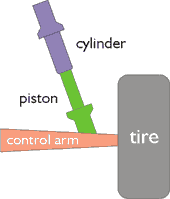
diagram 1: car suspension
the problem is how to fit the piston into the cylinder. the tire, which rolls
above the ground will move the control arm, which will move the piston up
(or down). when it does, the piston must remain in alignment with the cylinder
and vice-versa. but the oblique setup presents the main problem: the piston
might simply go directly straight up if the control arm rises.
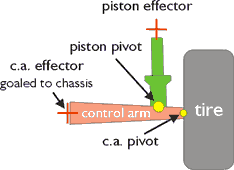
diagram 2: first IK familly
first we create the first family:
> tire
> control arm
>
control arm effector
>
piston
>
piston effector
before anything understand that the effectors give the IK system a mark where the object actually ends. the pivot point of any object in an IK chain is one end of the object and the effector marks the other end of it.
in this setup, the whole family must already be operating with goals already. if you move the tire, the control arm must swing up and down from the control arm effector, which is goaled to a specific point on the chassis. in effect it becomes a hinge. the piston, being in the same family as the control arm should move up and down securely with the control arm.
the piston effector must be prepared here because it is the object that will be a link to the other family.
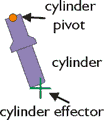
diagram 3: second family
now the second family:
> cylinder
> cylinder effector
the cylinder's pivot point should be above and parented to the chassis (immovable). the cylinder effector is below it.
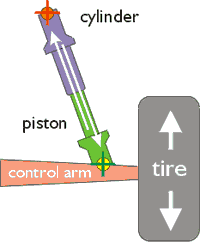
diagram 4: the way it works
here's the deal: simply assign the cylinder effector's IK goal object to the piston's pivot point. likewise, assign the piston effector's IK goal object to the cylinder's pivot point. you'll see that, logically, the two rods will always be aligned to one another because both of their effector ends will rotate their parents toward the other's base. and that is simply that.
you can take this a step further than i have by adding a spring and an underlying squash-and-stretch component.
this setup, by the way, does not account for spinning or turning tires. see tutorial below...
multiple IK families: dune buggy
this tutorial is focused specifically for lightwave 6. while previous lightwave versions will work fine as well as other apps, specific instructions for lightwave 6 were given.
note for lightwave 5.x users: the tutorial uses lw_expressions which is new. however, a script could be written to simulate this.
the tutorial is zipped and is downloaded here.
copyright©2001 lernie d ang
> simulating hand-held cameras
Learning without thought is labour lost; thought without learning is perilous.
-Confucius