| FAQ |
| Here are all the most common questions we get regarding skins. Please look through them, you might find your answer! If you have a question not listed here, go ahead and contact me! |
 |
| frequently asked questions |
 |
| Skin |
| Computer |
| Sketch |
| Stereo |
| Movie |
| Human |
| Stylish |
 |
|
|
|
|
|
| Anime |
|
 |
 |
|
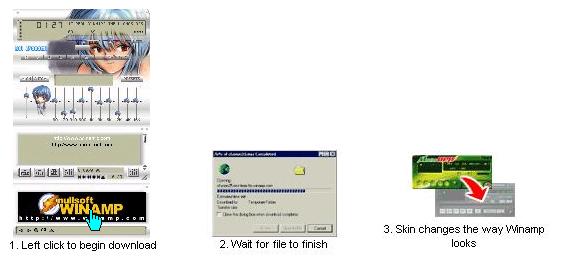
If you have Winamp correctly installed, the skins should install themselves automatically when downloading them from this site. Some skin files may be needed save it manually, so pls save the file in your Winamp Skins directory; this directory varies between computers, but if you installed Winamp in the standard location then it is C:\Program Files\Winamp\Skins. |
| Q. How do I install downloaded skins on my computer? |
| 1. Click the left of the top on the winamp player, the menu will come up pls select "Skins" simply select one of them and the skin will be set. If you want to change back the original one, just click the <Base Skin>. That's it! |
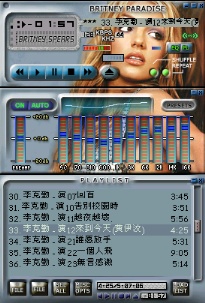
| 2. The Skin is changed you want now is Britney Paradise's skin. Try it!:) |
| Way (1) |
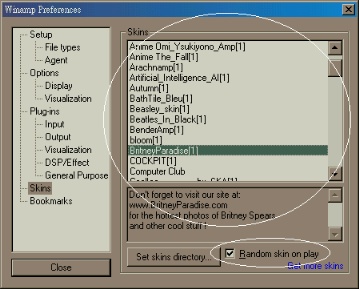
| 1. First you will need to open the Winamp (of course) and then press the key "Alt" "S" on the keyboard, a "Skin Browser" dialog will come up. The skins name will be the same as the name of the subdirectory you extracted the files to, now you can simply choose the skin you want to use. BTW, you could choose "Random skin on play" for the winamp change skin automatically |
| Way (2) |
| 2. The Skin is changed you want now is Britney Paradise's skin. Try it! :) |
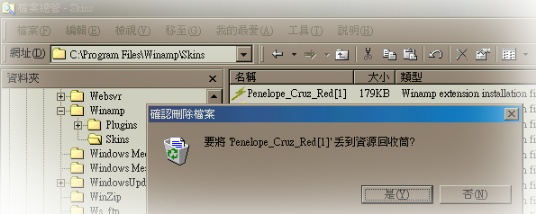
| Winamp/skins" directory which usualy locate is "C:\Program Files\Winamp\Skins", you could select the file and press "Del"on the keyboard which skin you dont like, that's it. |
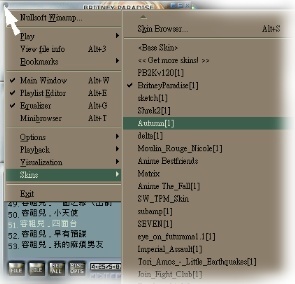 |
Change Skin is so easy. With your Winamp open, and then press the left of top of the wimanp, the menu dialog will come up, then choose you want skin. On the other way, you could press "Alt" & "S" on the keyboard, the skins browser also will come up, now you can simply choose the skin you want to use. You should see the new skin replace the default Winamp interface! |
 |
 |
|
|
|
 |
| Go Back |
| Music |
| Ecard |
| Travel |
| Wallpaper |
| Links |
| Movie |
| Home |
| Fun |
| Tools |
|
|
|
|
|
|
|
|
|
 |
| Q. How do I change my skin? |
| Q. How do I delete the skin i dont like it? |

|