|
Tutorial Cracking : Dump License Dongle HASP
|
Target :
Software ber-Dongle HASP
Tool :
Usb Dongle Search
HASP Emulator 2007
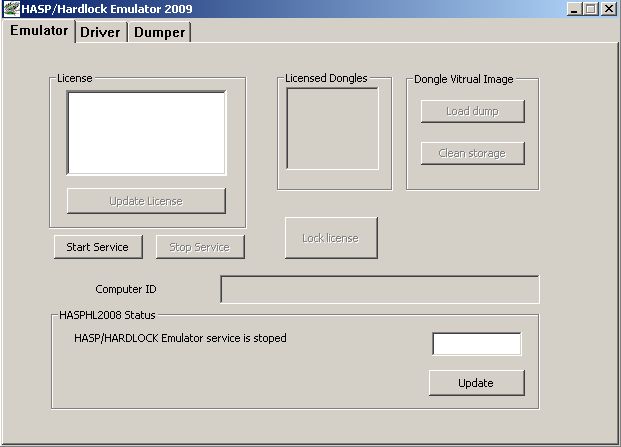
HASP Emulator 2009
- Emulates HASP3, HASP4 and HASP HL dongles.
- All types of HASP keys are supported: HASP, MemoHASP, NetHASP and TimeHASP.
- No limitation on quantity of supported programs.
- You can use emulator and original hardware key at the same time.
- Doesn't change anything within software and doesn't replace original driver.
Check Dongle
Gunakan Usb Dongle Search untuk melihat jenis dongle yang dipakai oleh softwarenya.
Ditutorial ini mencoba men-DUMP Dongle HASP.
Back Up Dongle
1. Instal dulu Latest HASP driver (di folder HASP_SRM_Runtime_setup)
2. Pastikan HASP asli konek ke LPT ato USB
3. Buka HASPHL2007.exe.
Install driver pada Tab Driver hingga berubah "Status : driver is installed"
4. Buka Tab "Emulator", kemudian klik "Start Service".
Jika bener kamu akan melihat status "HASP/HARDLOCK Emulator Service is running"
5. Buka tab "Dumper".
Akan keliatan log HASP pass di window HASP/HL Dongles
6. Kemudian klik DUMP dan simpen file *.DMP nya
Restore Dongle
(Load Dongle to Emulator)
1. Buka EDGEHASP.EXE (difolder Edge).
2. Sekarang buka dongle file *.DMP yg uda dibackup tadi pada tab HASP/HASPL
(sesuai tipe & browse dump location)
3. Enjoy!
Credit to : mjcoolz21
06/10/10
|