| farasG |
||||||||||||||||||
 |
||||||||||||||||||
|
||||||||||||||||||
|
||||||||||||||||||
|
|
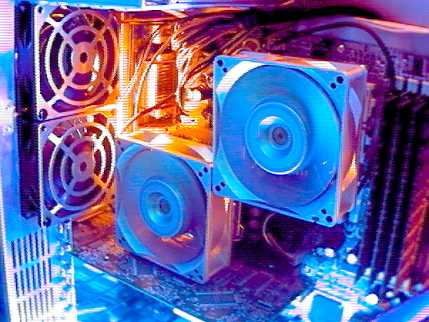
Jazz up the box A thing simple is a thing boring, as deemed by the peers that matter and hold value in today’s society. Whether it be your gear, your wheels or your crib; jazzing up the plot not only makes it go alluring on the eyes but earns valuable respect points on the streets. Similar to installing air-intakes in the bonnet, coloured brake calipers behind the alloys and that metallic twin muffler tip, you have the enthusiasts ruffling up a computer to obtain the same effect. Starting with the performance epicentre of a computer, there is over-clocking. All computers Over-clocking allows users to purchase a slower and cheaper processor and bung it to the speed of a more expensive one. This provides faster performance in applications and system tasks at no additional expense. The life-span of a processor, however, is negatively affected by over-clocking which comprises of higher operation frequencies, increased voltages and heat emission. Also, increased clock speeds and voltages result in higher power consumption and therefore higher power bills. Even with an increase in performance, without adequate cooling the excess heat produced by an over-clocked processing unit increases the air temperature of an interior case thus affecting other components in turn. Since over-clocking makes the CPU, and other components, work extra hard, it builds up additional heat inside the box. In the case of a normal desktop or tower casing, with a single exhaust and PSU fan, motherboard components are prone to severe malfunctions and premature demise. To waft away the stagnant heat-wave, over-clockers turn to more effective cooling solutions, often employing heavy duty heat-sinks, water cooling methods and more powerful fans. Heat-sinks and cooling fans are the most common form of cooling a computer. While the heat-sink sits nicely on top of the processor, with an optional layer of cooling gel between the two, the cooling fans are installed in the casing. Over-clocked processors usually have an extra-powerful fan installed on top of the heat-sink to percolate the stagnant heat layers. Modified casings have extra nettings where cooling fans can be installed. While installing multiple fans on the box, it is essential to devise an effective air-flow system to ensure inside temperature remains acceptable. Usually, for a twin-fan box, one fan is set up to draw in air from outside while the other fan, set up on the other side of the box, is set to blow it out. This allows cool air to pass through the computer, through the components, bringing the temperature down before being discharged at the other end and replaced by yet more cool air from the back. Water cooling is another method of heat removal from the computer. These systems are far more complex and expensive than standard PC cooling solutions, but offer a higher performance at heat dissipation and generally lower noise. The advantages of using water cooling over air cooling include water’s higher specific heat capacity and thermal conductivity, meaning water can transmit heat over greater distances with much less temperature difference. This method is implemented usually where large servers or gaming machines are concerned. A typical water cooling setup consists of a pump which circulates water and a radiator such as a large heat-sink possibly with a fan. These components are linked by tubes that carry the water. A drawback of the water cooling method, other than it being more expensive than air cooling, is liquids running through the system and can risk electrical shorts damaging or destroying the equipment.
For some, the benefits of two monitors can be enormous. It's a great way to compare two versions of a word document or to edit a webpage on one monitor while loading it up on the other to see what it will look like. Multiple screens also allow graphic designers to keep images on a side monitor and move them onto the main screen as and when needed. Stock traders utilise multiple displays as it allows them to monitor several markets simultaneously. If two distinct views of the world aren’t enough, the ATI board comes with software to create as many as five virtual desktops. Finally, after all the over-clocking is performed, the extra fans are installed, water cooling system is in place and you have multiple screens set up on your desk, it is time to pimp the ride. Modified casings catering specially to over-clockers and gaming enthusiasts are spacious, allowing extra room for additional components and easy installation. They also have extra fan grills, peripherals slots, transparent body, and front buttons and LCD displays to monitor and control CPU performance, fan speed, core temperature and the LEDs. Coloured LED fans ranging from blue, green, and red to multi-colours and neons not only provide a stunning view in darkness but also aid in keeping things cool and steady. Upright neon tubes, although of no practical use at all, are installed on the front panel to silence the on-lookers for a good minute or two. The glowing water cooling pipes (some having dyes mixed with water), neon processor fans and motherboard LEDs, together with the transparent casing, allow a stunning view into the world of PC components. Jazzing up the PC is time-consuming and requires a lot of research, knowledge, time, effort and money. However, it is not for the dedicated enthusiasts only. Even without the over-clocking and the water cooling and other thorny tasks, there is plenty out there to turn that innocent looking box into a freak-show that your friends will long to imitate and your family will despise with all their existence. |
|
|
||||||||||||||
|
||||||||||||||||||
|
|
|
|
|
||||||||||||||
|
||||||||||||||||||
| © 2009 Faras Ghani. Page template courtesy of ELATED.com. Last updated 12th May, 2009. |
||||||||||||||||||

 are shipped with the processor speed set at an optimum level providing the best execution mode under normal conditions and without fear of deracination. Over-clocking, however, is the process of forcing the processor to run at a higher clock rate than designed, or at its peak. It is practiced by PC enthusiasts in order to increase the performance of their computers.
 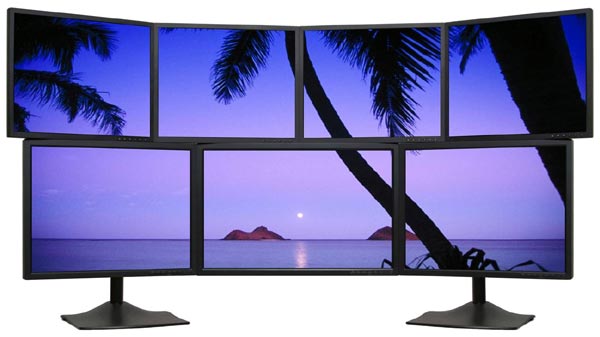 Another opulent add-on to your computer desk can be the implementation of multi screens. Seen the wide web of screens in The Matrix? It is quite simple to replicate that trend and install extra monitor screens on your computer. Slot in extra video cards in your vacant AGP or PCI slots on the motherboard and plug in the screen at the back. Windows XP allows easy configuration of additional screen straight from the desktop. Although a single 17” screen is more than enough to carry out the regular home or office-users’ tasks, having multiple screens is more of a luxury with a hint of arrogance. But why not? Be hard at a Need For Speed drag on one screen while clicking away on the internet trying to find that cheat code for unlimited NOS. It works. It’s even possible to plug in four adapters for as many as 16 monitors. But having two monitors is a cost-effective way to get more work space.