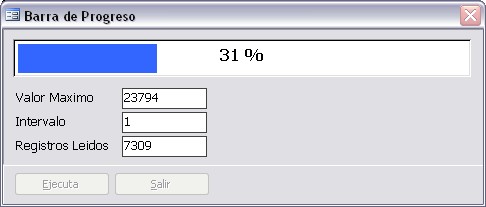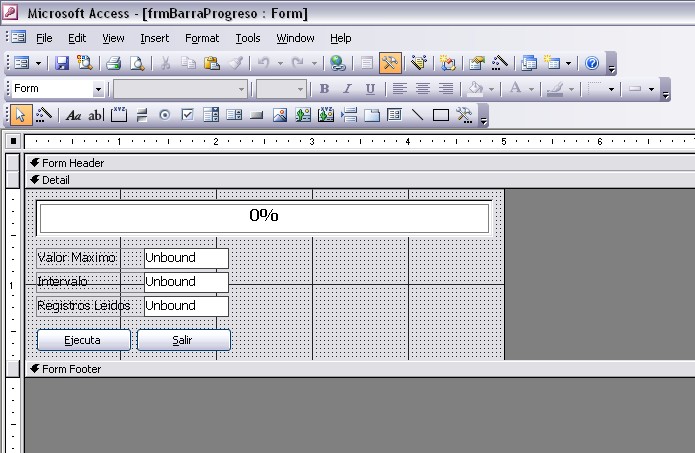
Antes que nada crea un formulario con los siguientes atributos:
Nombre: frmBarraProgreso
Titulo: Barra de progreso
Modal=Si
Emergente=Si
Botones de navegacion=No
Lineas de division=No
Selector de registros=No
Ancho=7200
Alto=2565
Estilo de borde=Delgado (Thin)
ControlBox=Si (Yes)
Botones Min Max=None
Close Button=No
Crea los siguientes controles con estos atributos:
Control Name: boxFrame
Control Type: Rectangulo
Top: 180
Left: 180
Width: 6840
Height: 540
=========================================
Control Name: lblPorcentaje
Caption:
Control Type: Etiqueta
Top: 240
Left: 240
Width: 0
Height: 420
=========================================
Control Name: lblCaption
Caption: 0%
Control Type: Etiqueta
Top: 240
Left: 240
Width: 6720
Height: 420
=========================================
Control Name: txtValMax
Control Type: Cuadro de Texto
Top: 900
Left: 1800
Width: 1260
Height: 300
=========================================
Control Name: Label4
Caption: Valor Maximo
Control Type: Etiqueta
Top: 900
Left: 180
Width: 1620
Height: 300
=========================================
Control Name: txtInter
Control Type: Cuadro de Texto
Top: 1260
Left: 1800
Width: 1260
Height: 300
=========================================
Control Name: Label6
Caption: Intervalo
Control Type: Etiqueta
Top: 1260
Left: 180
Width: 1620
Height: 300
=========================================
Control Name: txtRecordsRead
Control Type: Cuadro de Texto
Top: 1620
Left: 1800
Width: 1260
Height: 300
=========================================
Control Name: Label10
Caption: Registros Leidos
Control Type: Etiqueta
Top: 1620
Left: 180
Width: 1620
Height: 300
=========================================
Control Name: cmdRun
Caption: &Ejecuta
Control Type: Boton de Comando
Top: 2100
Left: 180
Width: 1440
Height: 360
=========================================
Control Name: cmdClose
Caption: &Salir
Control Type: Boton de Comando
Top: 2100
Left: 1680
Width: 1440
Height: 360
=========================================
Private Sub cmdClose_Click()
DoCmd.Close acForm, Me.Name
End Sub
Private Sub cmdRun_Click()
Dim i As Double '//Intervalo de avance
Dim j As Long '//Cuenta
Dim w As Long '//Ancho de la etiqueta de porcentaje
Dim rst As ADODB.Recordset
Set rst = New ADODB.Recordset
rst.Open "dbo_costs45", CurrentProject.Connection, adOpenKeyset, adLockReadOnly
'//Revisamos que el Recordset contenga registros
If rst.BOF And rst.EOF Then
MsgBox "no hay registros"
rst.Close
Set rst = Nothing
Exit Sub
End If
Me.txtValMax.SetFocus
Me.cmdRun.Enabled = False
Me.cmdClose.Enabled = False
'//Ponemos a 0 el ancho de la etiqueta lblPorcentaje que es la que representa el avance
Me.lblPorcentaje.Width = 0
'//Ponemos la cantidad de registros del Recordset en el campo txtValMax
Me.txtValMax = rst.RecordCount
Me.txtInter = 1
'//Intervalo de avance del porcentaje
i = Me.lblCaption.Width / rst.RecordCount
j = 1
Do Until rst.EOF
DoEvents
Me.lblPorcentaje.Width = j * i
Me.lblCaption.Caption = Round(((j * i) / Me.lblCaption.Width) * 100, 0) & " %"
Me.Repaint
txtRecordsRead = j
j = j + 1
rst.MoveNext
Loop
rst.Close
Set rst = Nothing
Me.cmdRun.Enabled = True
Me.cmdClose.Enabled = True
Exit Sub
Error_cmdRun_Click:
MsgBox "Ocurrio error " & Err.Number & ", " & Err.Description, vbCritical + vbOKOnly, "Aviso"
rst.Close
Set rst = Nothing
Me.cmdRun.Enabled = True
Me.cmdClose.Enabled = True
Exit Sub
End Sub