Hard copy is hard copy.You can read it , experiment it , prepare notes and
lot. So why read online samples when you can own a full copy for less than 4$
.Email [email protected] to buy hard copy
of the same. If you think the excel book can be improved please email the author
at [email protected]
Home
VLOOKUP helps us to retrieve data depending on specific
conditions. For instance consider the below figure ‘VLOOKUP in action’. We have
name and age. Let’s say we want to find the age when any one inputs the name.
This is where VLOOKUP comes to rescue. In the same figure we have two cells
‘Enter Name’ and depending on what is entered we need to display age in the row
below. So we have entered VLOOKUP formula on the Age column. VLOOKUP has four
inputs.
- The first input is what do we need to search. In this
case it’s whatever we have entered in the D7 column.
- Second we need to specify the rows and columns, from
which we want to enter data; in this case it’s from A1 to B5.
- The third input is from the table which column we need
to display in this case its age so value is 2 ( 1st column is
name and 2nd column is age).
- The fourth column defines whether we want an exact
match (false) or the closest match (true). For the current scenario we want
the exact match.
You can see from the figure below we have entered ‘Raju’
and it displayed age 26.
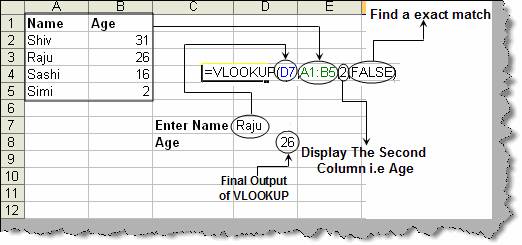
Figure: -
VLOOKUP in action
Hard copy is hard copy.You can read it , experiment it , prepare notes and
lot. So why read online samples when you can own a full copy for less than 4$
.Email [email protected] to buy hard copy
of the same. If you think the excel book can be improved please email the author
at [email protected]
Home