Hard copy is hard copy.You can read it , experiment it , prepare notes and
lot. So why read online samples when you can own a full copy for less than 4$
.Email [email protected] to buy hard copy
of the same. If you think the excel book can be improved please email the author
at [email protected]
Home
First let’s try to understand the problem. Lets say you
have a data something like ‘MA12345-890’ and you want to split the same in to
two columns one column will have ‘MA12345’ and the other column will have ‘890’.
Before we get in to how we can approach the problem we need to understand a
very important formula ‘MID’. Below figure ‘MID in action’ explains in detail
how ‘MID’ function works. ‘MID’ takes three arguments original text, start and
how many characters to extract from the original text. MID extracts a string
from a given string using the start position and number of characters from that
position. For instance if we have a string ‘Shivprasad’ , we can tell the ‘MID’
function please extract string from position ‘1’ to and ‘4’ characters from
position ‘1’. ‘MID’ will then give us ‘Shiv’ as output. Below figure ‘MID in
action’ explains the same in a more pictorial format.
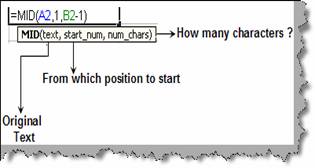
Figure: - MID
in action
To solve the above problem we need to follow four steps and
use three functions:-
- Step 1:- Below figure ‘MID, LEN and FIND in
action’ shows an EXCEL sheet with data ‘MA12345-890’. We need to split this
data in to ‘MA12345’ and ‘890’ in to different columns. The separation
between ‘MA12345’ and ‘890’ is by a ‘-‘. So the first step is we find at
what position is the ‘-‘located. You can see from the figure below in the
first column we have found where ‘-‘is located by using the find function.
Find function takes two parameters one is what to find and the other is the
text in which we need to find the same. This gives us ‘8’ i.e. the position
where ‘-‘is located.
- Step 2:- The second step is to find the total
length. This can be achieved by using the ‘len’ function. This results in
‘11’.
- Step 3:- Now we use the ‘mid’ function to find
out the first part of the text. We have already discussed ‘mid’ in the
previous section. To extract the first section we need to give the
position-1 (i.e. 8 – 1) of the ‘-‘as the number of characters to be
extracted, the start position as 1 and the original text.
- Step 4:- Now to find data after the ‘-‘we have
again used the ‘mid’ function. We have given the start position from where
we find the ‘-‘+ 1 (i.e. 8 + 1) and the number of characters is the total
length.
You can see from the below figure how we have successfully
extracted both data in to two different columns.
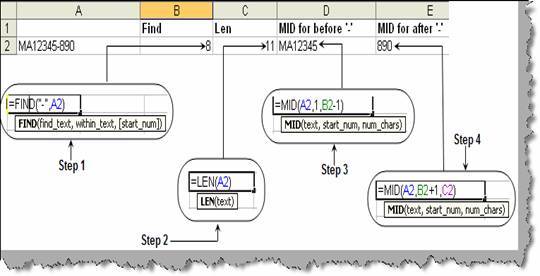
Figure: - MID,
LEN and FIND in action
Hard copy is hard copy.You can read it , experiment it , prepare notes and
lot. So why read online samples when you can own a full copy for less than 4$
.Email [email protected] to buy hard copy
of the same. If you think the excel book can be improved please email the author
at [email protected]
Home