Hard copy is hard copy.You can read it , experiment it , prepare notes and
lot. So why read online samples when you can own a full copy for less than 4$
.Email [email protected] to buy hard copy
of the same. If you think the excel book can be improved please email the author
at [email protected]
Home
In many financial report we would like to round the
financial amounts to the near by values. For instance consider the below figure
‘Round to the nearest value’. We have invoice amounts like 1500.98 which should
be rounded to 1501, 1356.91 should round to 1357 and so on. This can be achieved
by using the round function. ‘Round’ function takes two inputs first is the
original value which needs to be rounded and second till how much digits should
it be rounded. To round to nearest we will specify the same as zero currently.
If you apply the same you should get the output as shown in figure ‘Round to the
nearest value’.
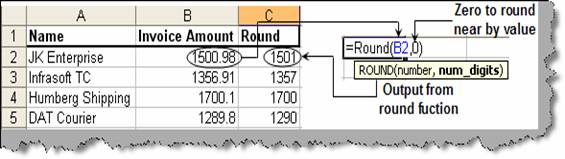
Figure: - Round
to the nearest valueHard copy is hard copy.You can read it ,
experiment it , prepare notes and lot. So why read online samples when you can
own a full copy for less than 4$ .Email
[email protected] to buy hard copy of the same. If you think the excel
book can be improved please email the author at
[email protected]
Home