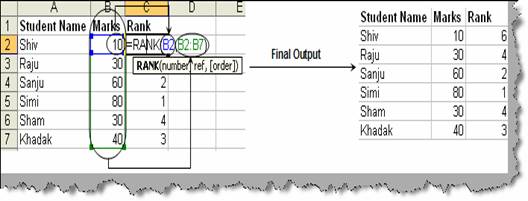
In many situations we need to find the rank in a give set of numeric data. Consider the figure ‘RANK in action’ where we are given a set of marks obtained by each student and we need to find the rank for the same. This can be achieved by using the ‘RANK’ action. ‘RANK’ function takes two inputs on is the exact value (number) and the other the complete list (ref). For instance for ‘Shiv’ we have specified the B2 as the number and ref value as array of list from B2 to B7 which is the list of student marks. Once you are done you can see that he has calculated the RANK. For ‘Raju’ and ‘Sham’ the values are equal so it has made a tie and ranked them same.
Figure: - RANK in action