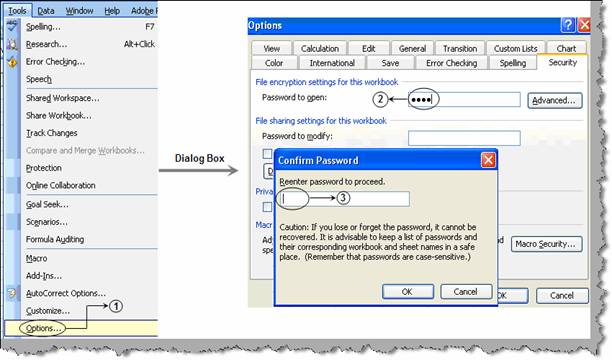
Security is one of the major concerns in today world. In many organizations crucial data like income statements, balance sheet etc are stored in EXCEL in some or other format. EXCEL provides a password protect feature by which you can restrict access to unauthorized user. To password protect EXCEL click on tools à options à and select the security tab as shown in figure ‘Specify password’. Specify a password and click ok. EXCEL will again prompt a password box to renter the password. This will confirm the password. You can now close the EXCEL sheet and open again. You will prompted with a EXCEL password dialog box , unless you do not enter the proper password it will not allow you to access the EXCEL data.
Figure: - Specify password