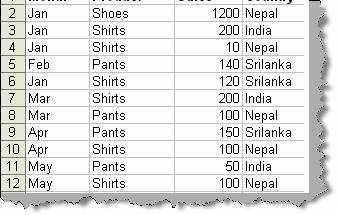
To create multi-dimension reports we need to use pivot tables. Let’s try to understand what the concept of multi-dimension reports is. Below figure ‘Sample sales data’ shows sales for a product according to country, product and month. Now let’s say we need to find what is the total sale for every product according to every country, this is where PIVOT table comes to rescue.
Figure: - Sample sales data
To start the pivot table dialog box click Data à Pivot table and Pivot chart report. You will be popped with the pivot wizard as shown in figure ‘Start pivot table’. Click next to move ahead.
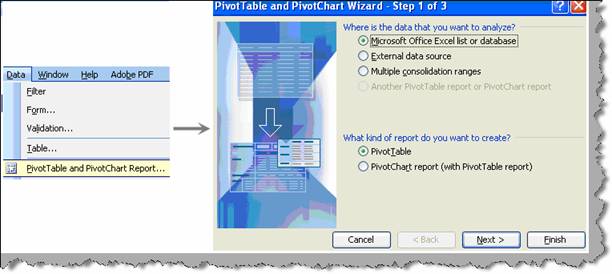
Figure: - Start pivot table
Once you click next you need to specify the pivot table data range as shown in figure ‘Specify pivot table range’.
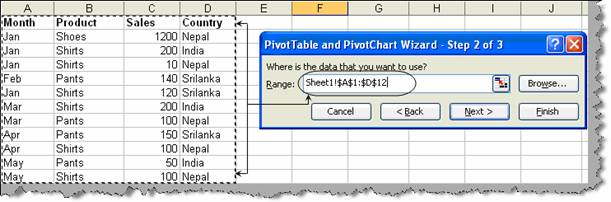
Figure: - Specify pivot table range
Once you have specified the pivot table range click finish. You will be popped with a placeholder area i.e. the drop area and pivot table field list as shown in figure ‘pivot drag and drop’. We need to drag the fields from the pivot field list and on the drop area. So drag the product on the drop row fields. Drag and drop the sales on the drop column fields. Finally drag the sales on the drop data items area. You can see the output as shown in the same figure ‘pivot drag and drop’. You can see how multidimensional reports give us a great insight. To experiment further drag and drop the month on the ‘Data row fields’ and you can analyze data in more detail.
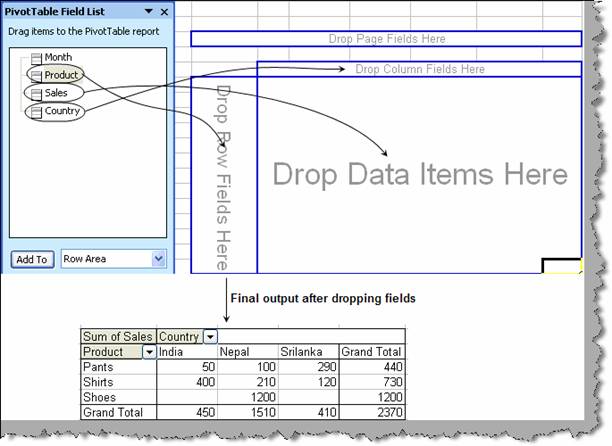
Figure: - Pivot drag and drop