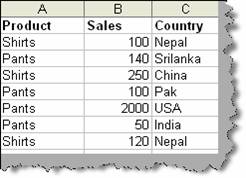
First let’s try to understand what the above problem means. Many times you want to implement complicated search and operations on huge data list. Consider the below table ‘Data list’ and lets say we want to get total sales depending on country or sales criteria.
Figure: - Data list
To achieve the same we can use database functions DSUM. ‘DSUM ‘takes three parameters database, field and criteria. Database is nothing but records with fields and data. For instance the above list is a database with fields (i.e. product, sales and country) while rows are nothing data as shown in figure ‘Database’.
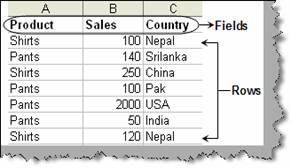
Figure: - Database
The second input is which field we want the formulae to be applied. In this example we want to sum it so we have specified the field ‘sales’. The third input is the criteria. For the current scenario we will take sales and country. Please note the criteria column names should be the same as the database list field names. Currently in the figure ‘DSUM in action’ we have no criteria so it has shown the sum of all sales.
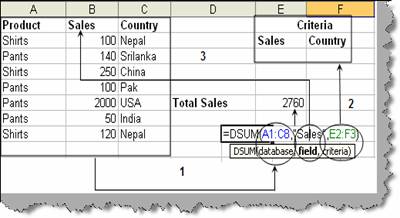
Figure: - DSUM in action
In the below figure we have given two snapshot one with ‘Criteria1’ which has only the country input i.e. Nepal. The second snapshot in the same figure is with ‘Criteria2’ with two inputs one with country as Nepal and sales should be greater than 100.
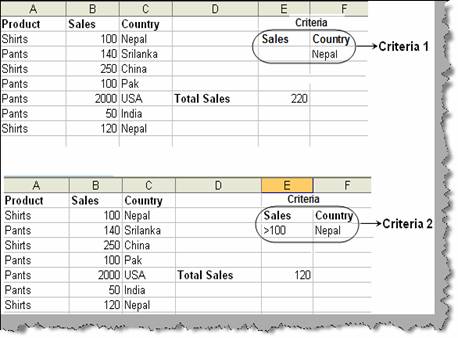
Figure: - SUM according to criteria
Like ‘DSUM’ there are other database formulas. Table ‘other database functions’ shows the list of the same. You can try experimenting yourself and we are sure it will minimize your lot of day to day complex search and calculation activities.
|
Function |
Return from the function |
|
DAVERAGE |
Average of entries |
|
DCOUNT |
Number of entries that contain numbers |
|
DCOUNTA |
Number of nonblank entries |
|
DGET |
A single record |
|
DMAX |
Maximum value |
|
DMIN |
Minimum value |
|
DPRODUCT |
Multiplies the values in specified field |
|
DSTDEV |
Estimate of standard deviation based on a sample of entries |
|
DSTDEVP |
Standard deviation based on all records matching criteria |
Table: - Other database functions