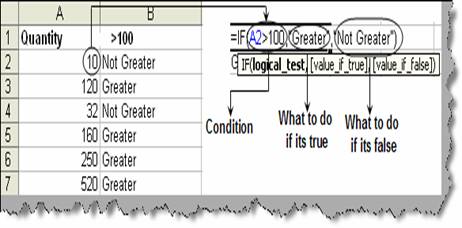
In many situations we need to work with conditions, like if something is true do this and if something is false then do that. For instance consider the below figure ‘Using IF condition’ where we want that if the quantity is greater than 100 then display ‘Not Greater’ or else display ‘Greater’. We can achieve the same using the ‘IF’ formula. It takes three parameters. First is the ‘logical_test’ which specifies the logical test. In this case it should be greater than 100. The second parameter is ‘value_if_true’. In this we specify what should be done if the condition evaluates true. For this scenario we are just displaying a text ‘Greater’. The final parameter is the ‘valu_if_false’. In this we specify what should be done if the condition evaluates false, for this scenario we will be displaying ‘Not Greater’. Once you have written the formulae for one row apply the same for the other rows and you should get something as shown in figure ‘Using IF condition’.