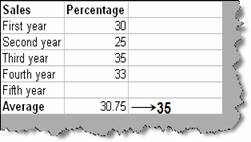
In normal scenarios excel takes input and gives out some output. Sometimes situation demands that depending on output we need to find what the input is. Let’s try to understand what does this mean. Consider the below situation outlined in figure ‘problem’ below. In the table we have sales percentage for every year. At the end of the row we have calculated the average of the percentage profit. This average is calculated for four years. Now we need to find out in order to achieve a profit percentage of 35 how much sales should do at the fifth year. So now we need to calculate input by which we can achieve an output (35 % average).
Figure: - Problem
We can calculate the same by using ‘goal seek’ command. So click on toolsà goal seek and you should be popped with a goal seek dialog box shown below. There are three values first is the ‘set cell’. ‘set cell’ column is nothing but the output cell so in this case it’s the cell which displays average value (B7). Second column is the ‘to value’. This column specifies what is the output targeted. As said previously we are targeting average of 35% so we specify the value 35. The third column ‘By Changing Cell’ is the input which needs to be calculated for the targeted output. In this case it’s the fifth year column. Once we specify all the three columns we are all set to get the input calculated for the target output. Click ok and you should see the auto adjusted value for input (fifth year sales percentage) and output (average) as shown in figure ‘Goal Seek in Action’.
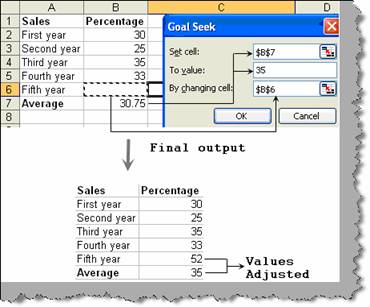
Figure: - Goal seek in action