
First let’s try to understand what the question means. Many time you come across scenarios where you want to extract data from a website and get it in to EXCEL. For example you want to get stock data in to EXCEL in a periodic basis and then do some calculation on the same. To extract data from web in to EXCEL we need to use ‘New web query’. To start ‘Web query’, click on Data à Import external data and New Web query as shown in figure ‘New web query’.
Figure: - New web query
Once you have clicked on ‘New Web Query’ you will be popped with dialog box as shown in figure ‘Import screen’. We have numbered the figure so that we can understand how to use the dialog box. 1 à In this section we enter the URL from where we want to extract data. 2 à Once you have entered the URL click the ‘go’ button. For the current example we will update date and time from http://www.timeanddate/worldclock/ web site. So we have loaded the web site in the ‘New Web Query’ dialog box. 3à Once the page is loaded you can see the symbols as shown in marking 3. 4 à We will extract the highlighted data. To extract the highlighted data click on the symbol. The symbol changes to a marked checkbox as shown in the below figure ‘Import screen’. Once you selected the area click on the button ‘import’.
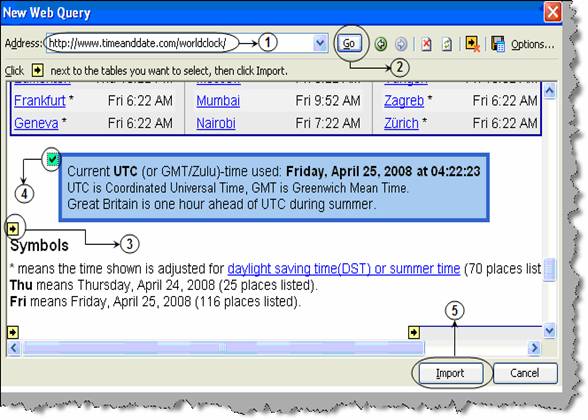
Figure: - Import screen
You will be then popped up with an ‘import data’ dialog box as shown in the figure below. We need to specify in which cell we need to import.
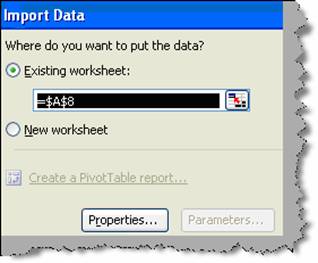
Figure: - Import data
In order to do a periodic refresh we need to specify certain properties. So click on the properties button and check the ‘refresh every’ check box. We can specify the refresh periodicity in the right combo. Currently we have specified as 1 minute.

Figure: - Web query properties
Once you have specified the refresh period click ok. You should get the output in the EXCEL sheet as shown in below figure ‘Actual data’. Wait for one minute and EXCEL will refresh the time appropriately.
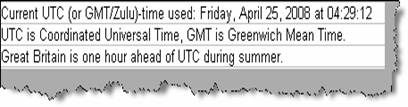
Figure: - Actual data
Note: - There are scenarios where you to extract currency rate or stock market value on regular basis from website in EXCEL. ‘Web Query’ comes as a great help in these scenarios.