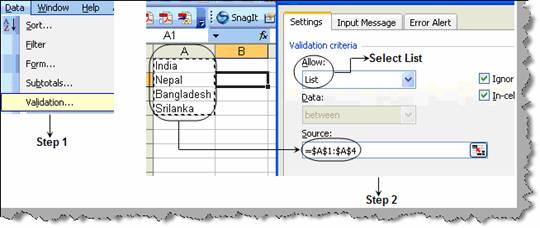
Many a times we want to create a dropdown combo box inside a cell itself to ensure that user does not input free text. To create the same click on Data à Validation as shown in step 1 in figure ‘Creating a drop down in EXCEL’. You will popped up with a dialog box as shown in step 2 in the same figure. In the ‘Allow’ select the type as list and in the source provide the data of the dropdown, for the current scenario it is the country names. So we have selected from A1 to A4.
Figure: - Creating a drop down in EXCEL
Once you click ok you should see the final output as shown in figure ‘Final Output’.
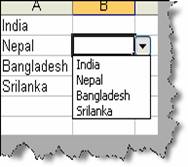
Figure :- Final output