In the first question we saw how we can do linear regression using the data regression tool. There are three other formulas (linest, forecast and trend) which give the same output as we have got from the data regression tool. Let’s understand all the three formula step by step.
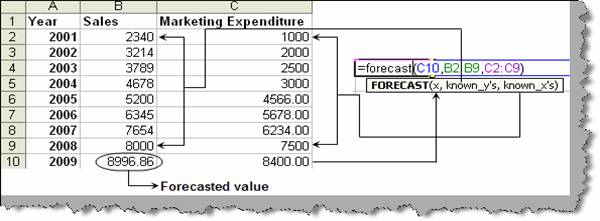
Forecast: - Forecast gives a single value output by taking in series of history ‘X’ and ‘Y’ values. Below figure ‘Forecast function’ shows the input and the output. Please note dependent variables should be fed in ‘known_y’ while independent variable should be fed in ‘known_x’.
Figure: - Forecast function
Trend: - Trend is an extension of the forecast function. Forecast take single ‘X’ input and gives single ‘Y’ output. Now lets say we have a scenario where we have array of ‘X’ inputs which will give array of ‘Y’ outputs. This is where ‘Trend’ function comes in to picture. Below figure ‘Trend in action’ shows how the function works. It can take array of ‘X’ values using ‘new_xs’. In the below figure ‘Trend in action’ you can see we have series of ‘X’ input for year 2009, 2010, 2011 and 2012. So here is how we can feed in the array:-
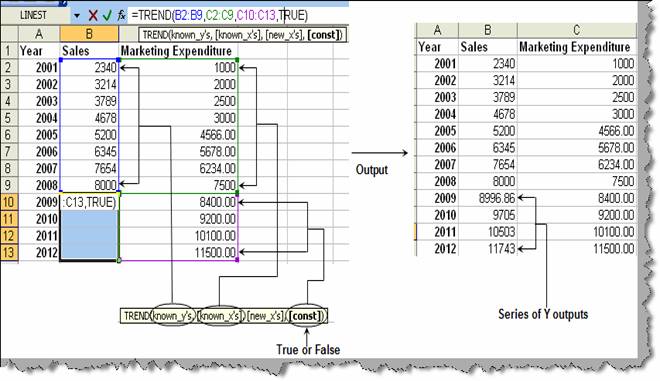
Figure: - Trend in action
We have one more variable CONST. This is set to TRUE or FALSE. If it’s TRUE it includes the INTERCEPT or else it excludes it. Currently we have set it to TRUE which means it has included the intercept.
Linest: - Linest function is mini scaled version of regression analysis. The report generated by running regression analysis is very detailed version and is also quiet confusing. We need only three values (slope, intercept and R Square) to conclude the equation. So lets understand how we can use the linest function. Below figure ‘Linest in action’ shows how the formula works.
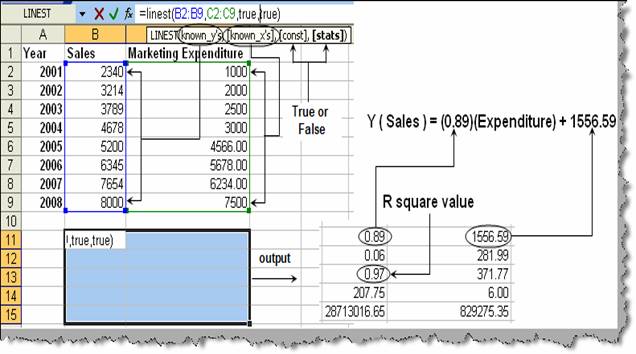
Figure: - Linest in action
Figure ‘Linest in action’ shows how the output of linest formula maps to the linear equation formulae.