Hard copy is hard copy.You can read it , experiment it , prepare notes and lot. So why read online samples when you can own a full copy for less than 4$ .Email [email protected]  to buy hard copy of the same. If you think the excel book can be improved please email the author at [email protected]
 

Home

How do we concatenate in excel?

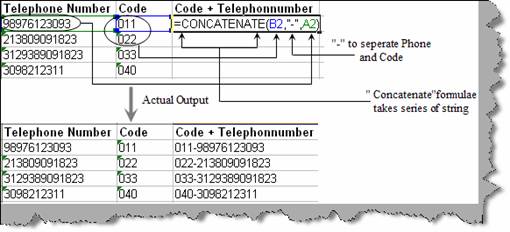
Concatenation is one of the common problems which occur in excel documentation. For instance below figure ‘Concatenation in action’ shows we need to concatenate the telephone number with code. While doing the concatenation we also need to separate the telephone number and area code with hyphen (“-“). This can be easily achieved by using the ‘Concatenate’ keyword. ‘Concatenate’ keyword takes series of string value and displays the same in a concatenated fashion. You can see from the figure the first is the area code, second input is the hyphen “-“and the final is the telephone number. We have also shown the actual output for the same in the same figure.


Figure: - Concatenation in action

Hard copy is hard copy.You can read it , experiment it , prepare notes and lot. So why read online samples when you can own a full copy for less than 4$ .Email [email protected]  to buy hard copy of the same. If you think the excel book can be improved please email the author at [email protected]
 

Home

Hosted by www.Geocities.ws

1